website

Monthly Archive for October, 2009

SendBlaster = A Cost-Effective and Powerful Email Marketing Software

Email marketing can be an efficient way to reach customers, increase sales and boost your brand. Regardless of your type of business, it should be an integral part of your marketing strategy. First and foremost you should establish what the goals for your email marketing campaigns are (branding awereness, increas sales, improve engagement, and so on), and then determine your budget that can be relatively small compared to other marketing channels. Once you have determined these factors, it is time to begin seeking a tool that can execute your email program. There are dozens of different solutions out there. But how do you choose between an email marketing software and email marketing service (ESPs)?
We feel confident that our award winning email marketing software SendBlaster can fit your needs by keeping your costs down and letting manage effective email marketing campaigns.
Some of the many advantages of SendBlaster compared to ESPs:

Continue reading ‘SendBlaster = A Cost-Effective and Powerful Email Marketing Software’

Fake Facebook e-mail contains Trojan

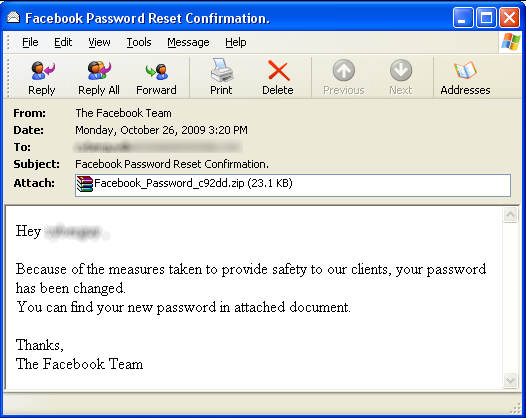
There’s a new virus spreading via email which targets Facebook users. According to mxlab, the email includes downloadable files which include the Trojan virus: Bredolab. Anybody who receives a “Facebook Password Reset Confirmation” email should delete it right away.

According to mxlab, the message is as follows:

facebook_spam_malware

“This virus is being distributed through email, not on Facebook. The email is disguised as a Facebook password reset e-mail with an attachment that purportedly contains the new password, but is actually the virus. We’re educating users on how to detect this through the Facebook Security Page.”

Bredolab is a trojan horse that downloads and executes files from the Internet, such as rogue anti-spyware. To bypass firewalls, it injects its own code into legitimate processes svchost.exe and explorer.exe. Bredolab contains anti-sandbox code (the trojan might quit itself when an external program investigates its actions).

Facebook also said that users should be “suspicious of unexpected emails claiming to be from Facebook” and that it never sends users a new password as an attachment in emails.

Email Footers: Best Practices & Tips

Footers are probably the last read part of the email but they are certainly not least.
Nowadays readers expect that footers should also display relevant information about your business and your brand.
That’s why you should consider them as part of your email marketing strategy. In other words don’t understate them!
At least you should include:

  • Your company’s physical address
  • A clear unsubscribe link allowing your readers to opt-out  (“If you do not want to you no longer wish to receive information from us, please CLICK HERE TO UNSUBSCRIBE”)
  • Your copyright notice to protect your intellectual property
  • A privacy policy link
  • Any disclaimers referencing special offers or promotions mentioned in the email
  • Any information required by your anti-spam legislation such as the US Can-Spam Act

Continue reading ‘Email Footers: Best Practices & Tips’

What Is The Best Time To Send a Newsletter?

274841_calender_colors_1Is it really important to discover the best time to send email marketing campaigns? Absolutely yes!  If they are launched at a wrong time, then it can weaken the campaign ROI entirely.
The problem is that it’s quite difficult to determine it because it depends on numerous variables and specific situations, e.g. the content of your email,  your business, your target.
We’d like to share some guidelines regarding the best & worst times to send your email campaigns.

MONDAY
Monday is considered the worst day to send a newsletter, especially if  you send out your mails to businesses.  People are burdened with all the e-mails received during the weekend and are busy settling into their week.

TUESDAY
Tuesday is considered the optimal day especially to reach a corporate audience. People have cleaned the weekend spam from their inboxes and have organized their week.

WEDNESDAY & THURSDAY

Statistics show that mail campaigns sent on Wednesdays score the highest open rates and click-through rates and that Thursday is the most popular day for sending email campaigns.

Continue reading ‘What Is The Best Time To Send a Newsletter?’

Gmail, Msn Live, Yahoo! Mail, AOL SMTP Settings to Use in SendBlaster

When you send out your mailing using an external SMTP server, SendBlaster will delay the message  and the SMTP server itself will then delivery it.  All you have to do is to configure correctly those smtp settings.
Today we want to focus on SMTP settings regarding the most popular web mail providers: Gmail, Msn Live, Yahoo! Mail, AOL.  They come with different settings and policies, be aware!

First, open SendBlaster, select  “Messages” section and then click  on “Send”.
In “Send settings”  enable “SMTP Server” checkbox and choose your favorite SMTP server.

GMAIL
SMTP server: smtp.gmail.com
Port: 465 or 587
“SSL”: enabled
Authentication required: enabled
Username: your full email address (including @gmail.com)
Password: your Gmail password

Before using your Gmail account as your SMTP server, be sure that you have enabled Gmail POP3 or Gmail IMAP through settings in your Gmail Account.

Continue reading ‘Gmail, Msn Live, Yahoo! Mail, AOL SMTP Settings to Use in SendBlaster’

Web 2.0: 5 Cool E-mail Tools

emailDo you want to give more power to your email?  We selected 5 Free tools that will allow you to discover new ways to use it.

Moomeo – Just launched. It allows people to share emails. You send an email to Moomeo service email address, receive a Moomeo link to you email back, and share it on Twitter, Facebook, or anywhere online.

Voice on the Go – This service allow to listen to, compose, forward and delete your emails by voice, all without typing. No software to download. It works from any mobile phone on any network. Nice video demostration.

Feed My Inbox – Only 3% of computer users are familiar with how feeds work. FeedMyInbox makes it simple and provides you the feeds (RSS, XML, Atom) of your favorite blogs, news and sites directly to your E-mail inbox.

Zemanta – In real-time, while you type your blog posts or emails Zemanta suggest tags, links, photos, and related articles. Zemanta supports Wodpress, Blogger, TypePad, Movable Type, Ning, Drupal, LiveJournal, Tumblr and email platforms Google Mail and Yahoo!Mail.

Mailbeans – Mailbeans is a web-based service of email aggregation and management which allows users to keep all their email accounts on the web in a same place. It differs form usual webmail services both in the technological approach to email management as well as in the UI paradigm.

200+ Spam Words and Phrases To Avoid in Your Email Newsletters

Spam Words Do it Today!, Increase Traffic, Free, As Seen on…
Do you usually use these phrases in your email newsletters? Well, if you do not want to be flagged as a spammer forget them! Spam filters perform regular tests on mail messages to determine if they are spam or not.
Most of them work on a point system, so that the occurrence of just one “spam phrase” probably will not trigger rejection. But if your points are too high, your message will get blocked, even if well designed and formatted.

The good news is that you can save your deliverability by avoiding all those “spam” words and combinations of words.
Here is a (not definitive) list of 200+ spam words.

Continue reading ’200+ Spam Words and Phrases To Avoid in Your Email Newsletters’


Load Times Plugin made by Cheap Web Hosting