website

Monthly Archive for September, 2010

Privacy Policy – Take it Seriously!

Before beginning to collect email addresses, make sure to establish a clear, concise and transparent privacy policy.
It is fundamental that you let your subscribers know that their personal information will be kept safe and confidential, explaining how their information will be used and if you plan to share their information to outside parties.
An accurate privacy policy will help you build and maintain a trust relationship with your subscribers. On the other hand, if you do not provide enough information about every step of the opt-in process , your prospects and existing subscribers may not feel protected. As a consequence, the lack of privacy could affect your email marketing activities and, in general, your business.

In particular make sure to reply to these important questions:

  • How do you protect your subscribers’ information?
  • What do you use their information for?
  • Do you disclose any information to third parties?
  • What kind of communications are they subscribed to? (newsletter, special offers, service announcements,…)

Review it many times before it is too late!
When you are ready to publish it, make sure to keep your privacy policy easily accessible on your website.

If you change the opt-in process, be sure to update your policy and post those changes on the privacy page.

Reminding Your Subscribers to Update Their Data

According to a recent study conducted by ReturnPath, more than 30% of e-mail users change their e-mail addresses every year.
The main reasons why so many users change their e-mail address are that they switch their ISPs, change their jobs or simply try to avoid spam.

A good way to avoid loosing a large part of your addresses accumulated over years is to remind your subscribers to update their details. This action should be taken
reguarly, not every now and then.

Continue reading ‘Reminding Your Subscribers to Update Their Data’

Which Email Style Suits Your Business Best?

In a recent blog post for MarketingProfs.com, Stephanie Miller, an email marketing expert, describes how Scotts Miracle-Gro uses its newsletter to generate sales. The email is targeted by grass type and zip code, information captured at registration, and is sent monthly during the growing season. It also stops entirely during the off-season which can last as long as six months in some areas.

The information the newsletter contains is entirely didactic. It doesn’t push special offers. It doesn’t announce bargains. It doesn’t even have a call-to-action, hardly a surprise when you consider that the firm has no online sales channel. It simply informs and teachers customers about growing grass.

And yet, says Miller, the newsletter is responsible for boosting sales by annual average of 150 percent.

Continue reading ‘Which Email Style Suits Your Business Best?’

Gmail’s Priority Inbox: A New Challenge For Email Marketing

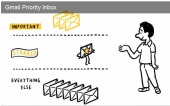
Over the past week, there has been a big debate about the introduction of Google’s Gmail Priority Inbox, a new (optional) feature that allows Gmail users to sort and organize emails based on their importance.

It’s not easy to predict how Gmail’s users will react to this new tool. But, what is clear is that Priority Inbox is already drawing a lot of interest from the email marketing community. So far, reactions have been mixed, but taken together they seems to be slightly positive.
Let’s do a quick round up!

SendLabs‘s Inbound Marketing Director Josh Nason wrote that “Gmail’s Priority Inbox isn’t a threat, but an opportunity”.
“Gmail’s new setup will take some time to get used to, but I think it’s a major benefit. For those of us designing and developing campaigns, it’s up to us to provide that instant “This is important!” feeling for the end users”.

SparkMinute blogger David Spark expressed his skepticism calling the Gmail Priority Inbox “the new spam folder”
“How soon will it take before this secondary folder is treated with the same respect as your spam folder? As more and more information comes in more stuff will be relegated to the secondary folder never to be looked at again. We already do this today. How many of you have an “I’ll look at it later” folder? And how often have you looked at that folder? Should be called an “I’ll look at it never” folder.”

Continue reading ‘Gmail’s Priority Inbox: A New Challenge For Email Marketing’

Dealing with Objections in Email Marketing

Start learning about marketing and one of the first things you’ll be told is the importance of knocking down objections. Leads will always have reasons not to buy. The salesman’s job is to listen to those reasons, then explain why they’re false. If the salesman manages to remove all of those objections, he gets the handshake. If he doesn’t get the handshake, it’s because he missed an objection.

That’s salesmanship in a nutshell and it applies online too. Those long one-page sales letters give copywriters room to address every objection they can think of. The FAQ pages on websites should really be renamed “Frequently Raised Objections.” Smart copywriters will use those pages to state objections that leads would raise, then knock each one down in turn.

For email marketers though, the objections — and the way you need to deal with them — are unique.

Because everyone who reads your email messages has chosen to accept them, you know you’re dealing with a selected audience. Your readers already trust you. They like your products and believe they need them otherwise they wouldn’t have agreed to continue reading about them.

In theory then, with an audience that primed, you should be receiving a 100 percent conversion rate instead of the single figures you might expect from a mailout.

So what are the objections getting in the way of your sales, and how can you deal with them?

The biggest is urgency. Readers will see a product in your email message, and recognize that they’d like to buy it. They might even feel they need it. But those who don’t feel they need it right away, are likely to ignore it and wait until they feel they do. “That’s interesting,” they’ll say. “I’ll think about it.”

Continue reading ‘Dealing with Objections in Email Marketing’

Adding List-Unsubscribe Header Improves Reliability and Reduces Complaints

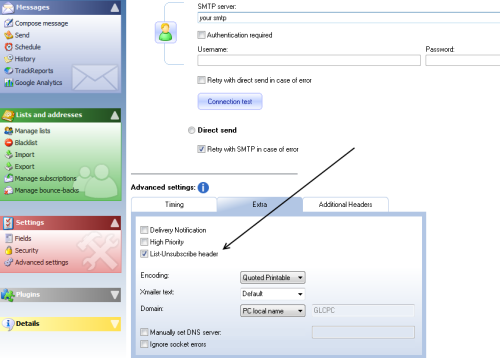
One of the new features that we’ve added in the latest version of SendBlaster is the support for the list-unsubscribe header.  This, in brief, intends to facilitate unsubscribing of mailing lists.
As we know, according to the CAN-SPAM ACT and other international anti-spam laws, every commercial email message you send  must contain an “unsubscribe“ link or other mechanism that allows subscribers to remove themselves from your mailing list.  But it may happen that even if the unsubscribe link is included in your mailings, some subscribers are not able to find it. As a result, they are likely to hit the “Mark as Spam” button.

So, why is it important to enable the list-unsubscribe header?

Because every time a “frustated” recipient uses that “Mark as Spam” button to unsubscribe your sender reputation is affected.

The list-unsubscribe header comes to help senders reduce spam complaints  and improve deliverability.  This is possible because, when it is enabled, the process to unsubscribe is simpler and immediate.   Recipients will see an Unsubscribe button, or link, they can click if they would like to automatically stop future messages.

The list-unsubscribe header has been widely supported by major software vendors and ISPs, such Microsoft Windows Live, Yahoo! and Google Gmail (selected senders).

So, how to enable the list-unsubscribe header in SendBlaster?

Continue reading ‘Adding List-Unsubscribe Header Improves Reliability and Reduces Complaints’


Load Times Plugin made by Cheap Web Hosting