website

Monthly Archive for October, 2010

Don’t Make Your Newsletter Look Like an Ad

Anyone who has ever tried to generate revenue by placing AdSense units on their website quickly comes to realize that success relies on a fundamental principle: don’t make your newsletter look like ads.

When readers feel that they’re being marketed to, they tend to ignore the message. At best, they give the ad a quick glance, placing greater emphasis on the headline and keywords. At worst, they recognize that they’re being pitched and learn to avoid looking in the areas of the page that carry the ads. It’s a principle that’s made optimizing AdSense units such an important part of website monetization.

For email marketers, the punishment for appearing to pitch a product that a lead doesn’t want is even more severe. When subscribers feel that they’re receiving messages that don’t engage them, they unsubscribe, removing any future possibility of turning them into customers.

One solution is to pay for the reader’s attention by offering discounts and bargains. Even if a subscriber doesn’t want to buy now, they might want to use that discount in the future. When unsubscribing carries a penalty, they keep reading.

Continue reading ‘Don’t Make Your Newsletter Look Like an Ad’

It’s Halloween Again – 4 FREE and Scary Email Templates

It’s Halloween time again and maybe you are looking for some good free templates to customize and send to your subscribers.

Here below you can find a set of templates (4) ready to use for your Halloween emails. Of course, you can also edit them, for example adding your logo, new icons or changing fonts.

How to use Halloween HTML email templates:
Download Halloween email template pack (zip)
Extract  and copy .eml files in C:/Documents/SendBlaster2/Template
(in C:/Programs/Sendblaster/Template for SendBlaster 1.x versions)
Open SendBlaster (or download it)
Select “Compose message”
Click on “Choose template”
Choose your favorite Halloween template (halloween 1, halloween 2, halloween 3, halloween 4)

Matching Your Newsletter Style to Your Business Approach

The first newsletter is always the hardest. With a million different templates to choose from or a professional designer ready to create your own unique look, getting your email campaign up and running really shouldn’t be difficult.

But all of those options just make it harder to make the first choice: which style matches your company best?
In practice, businesses choose one of three options.

For small firms, in which the founder is identified closely with the product, newsletters tend to be personal. They use the first person, describe partners as “friends” and discuss experiences at conferences, talks and meetings. For small firms and small industries, fields in which buyers may know each other and feel a close personal connection, the newsletter can be a powerful way of cementing a relationship and using it to deliver offers. If you have an active Twitter account or a business Facebook page which generates discussions to which you personally contribute, it’s a simple option that may be the right choice for you.

Continue reading ‘Matching Your Newsletter Style to Your Business Approach’

Real Customers, Real Questions, Real Answers

SendBlaster‘s customers enjoy free support for life.  Our operators are ready to solve any  issues through a ticketing system, able to keep track of  each request in an efficient way.
In addition, anyone (free users included) can join us on Facebook and Twitter and ask general questions on any topic.

Today, we’d like to share a couple of questions we answered in the recent past on our social profiles, so others can benefit too:

1. Can you tell me where SendBlaster keeps smtp logs?
You can access them from “History” – select a mailing and press “log” button. The original text files are saved in “My documents\SendBlaster2\history” folder.

2. History indicates emails are sent. However, Gmail gives messages that there is a permanent delivery failure of the same address. Is Gmail giving wrong results?
When you use SMTP, you can only know whether a message was sent, which means accepted by the SMTP server; this doesn’t mean it has reached the recipient – you need to process the bounce-backs for this.

Continue reading ‘Real Customers, Real Questions, Real Answers’

7 Books To Enhance Your Email Marketing Skills

Email Marketing blogs are a precious source for information and discussion. They are the simplest way to keep updated with the latest trends and current best practices.
If you are directly involved in email marketing activities and truly want to enhance your skills, it is also a good idea to spend some time reading printed books!
In the last months some really useful books have been published about email marketing.
Here below you find our selection of must-read books about email campaigns, effective newsletters, and much more.

1. The Truth About Email Marketing
by  Simms Jenkins

“Industry expert, Simms Jenkins, provides a set of best practices to help you assess and refine your strategy and tac tics. Your orga nization can gain much from new and proven approaches to email marketing: strengthen cus­tomer relation ships, create loyalty, and build trust and awareness. The result is increased responses in sales, leads, registrations, and more.”

Continue reading ’7 Books To Enhance Your Email Marketing Skills’

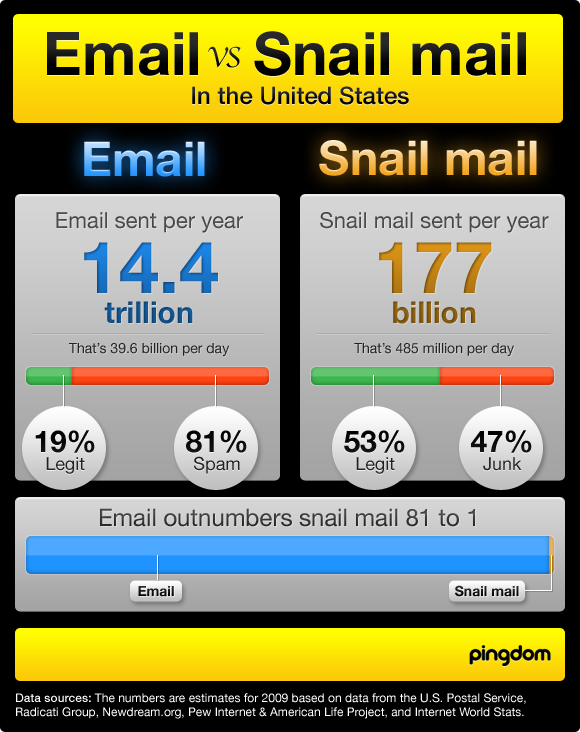
Infographic: Email vs Snail Mail

Email beats Snail Mail 81 to 1!
14.4 trillion emails are sent each year in the US compared to 177 billion envelopes of snail mail.  In more detail, 81% of  them are spam, while “only” 47% of postal letters are considered unwanted  and are thrown into the recycle bin.

Check out this great infographic, created by Pingdom, that displays some impressive statistics about email vs snail mail.

Mailing Offers Your Market Wants To Buy

Browse to Amazon.com and you won’t have to look too far to find products you want to buy. In fact, you won’t have to look at all. The site will read your cookie, check your sales record and serve up products that it thinks match your interests. Email marketers can’t deliver that kind of personalized sales service even though the penalty of delivering the wrong offers are so much higher.
An Internet user who doesn’t see a product he wants to buy on a website will leave and may come back later. An email reader who doesn’t see offers he wants to use, will unsubscribe and never buy again.

Filter Your Subscribers
One solution is to filter subscribers at registration. Firefly Photography, for example, a photography business in Philadelphia, invites leads to leave their email addresses when they use the contact form, then refers them to a page where they can choose up to seven different kinds of newsletters and promotions. That ensures that subscribers only receive information they’ve indicated they want to read but it does limit the ability to cross-market, build desire or push a brand. A wedding photography lead might not be interested in baby photography now, but she could be ready to buy in a year’s time. Because she won’t have received the baby photography newsletters though, she might not order it from Firefly.

Continue reading ‘Mailing Offers Your Market Wants To Buy’


Load Times Plugin made by Cheap Web Hosting