website

Monthly Archive for November, 2011

10 Reasons to Choose a Professional SMTP Service
Our users know very well that SendBlaster supports any SMTP servers in the world.
Standard (free) SMTP servers are good if you manage small email lists. For example Google Gmail allows sending up to 250 daily messages using its SMTP.

If you manage to send thousands of newsletters to your large email list through your standard SMTP server, they may never arrive in your recipients’ inboxes.  Why? Because Internet Service Providers (ISPs) often limit the number of messages a sender can send at once while also aggressively filtering incoming messages.  Dedicated SMTP servers solve these problems. Below are 10 compelling reasons to switch to a dedicated SMTP service provider:

  1. Improved Deliverability – ISPs do their part to eradicate spam by blacklisting IP addresses. Dedicated SMTP service providers work with major email providers to ensure that the dedicated SMTP server remains whitelisted.
  2. Easy Setup – Setting up a professional SMTP service is a simply matter of modifying your email client’s SMTP settings.
  3. Ease of Use – Sending thousands of messages in small batches to get around volume limits is tedious and time consuming. With a dedicated SMTP server, you can send thousands of bulk email messages with a single click from within your email client software.
    Continue reading ’10 Reasons to Choose a Professional SMTP Service’

What Annoys People About Emails [Infographic]

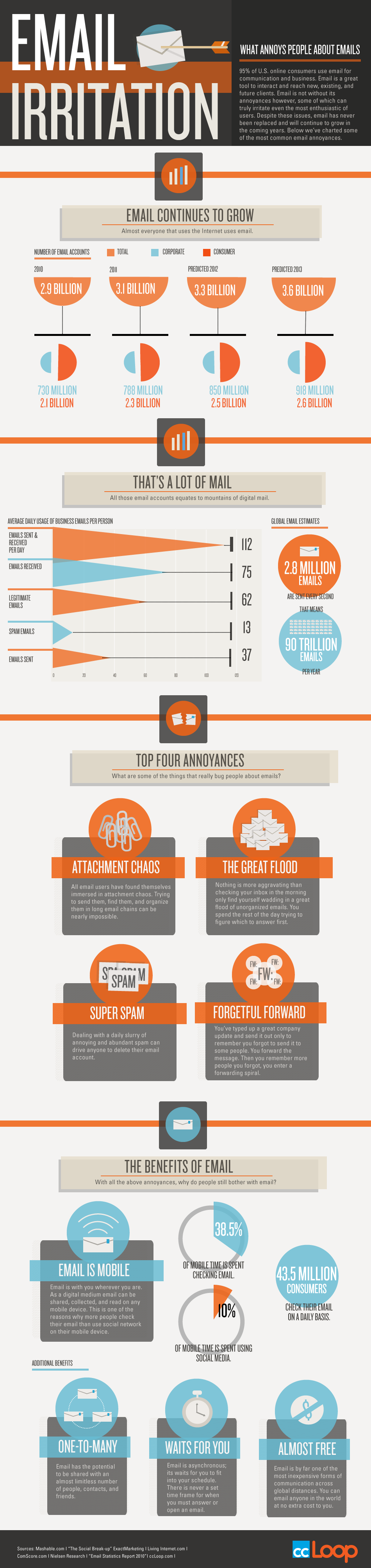
Here is an awesome infographic by ccLoop, the winner of the 2011 AlwaysOn Global 250, focused on the growth of Email, volume of Email in numbers, Top 4 Annoyances and benefits of Email.

Click the image for a full-sized version

Building A List From Your List

The usual way of growing a subscriber list is to place an invitation on a website, sweeten the offer with the promise of a free download, hope that enough people visit your Web page, and pray that enough of them convert to keep your list big and strong.

Citrix Online, creators of online collaboration tool GoToMeeting, took a more creative approach. The company, whose email marketing efforts recently won it the Best-in-Show B2B award at MarketingSherpa’s 2012 email awards, targeted not website visitors but subscribers.
The goal of the campaign was to convert the housefile list into sales qualified leads, and later into buyers. But the campaign had a secondary goal of increasing the size of the list itself.
According to MarketingSherpa’s award report, the campaign was spectacularly effective. New leads from the campaign were up by as much 40 percent for some products. In addition though, the list itself grew by 35 percent, a rise of “several million contacts.”
“We are generating demand without having to directly pay for the usual media channels like banner ads, AdWords, etc.,” the company said in its nomination.

So what exactly did Citrix do to achieve those figures?
Actually, not much more than email marketers should be doing anyway. They were just a little smarter and a touch less subtle.
First, the company used list segmentation. Subscribers were sent weekly emails targeted by interest, something they’d been doing since 2008. This time though, they added share links to the email footers that led to landing pages and “thank you” pages. To make sure that readers used them, they added a direct appeal. One email offering a brief on leading virtual teams included the request “Please forward this to colleagues who might be interested in learning more.” The same appeal was also used in an email offering access to a free webinar.

Continue reading ‘Building A List From Your List’

Updates on TrackReports

Recently, a large spam abuse occurred on TrackReports service. While TrackReports – as all of you know – is not a delivery service, and it just tracks opens and clicks as many other similar systems, thousands of spam messages have been circulating, which included TrackReports’ url in their body. The service administrators have constantly being managing spam complaints and deleting spammers accounts; but that apparently has not been enough. As a result, even if TrackReports is not responsible for sending out the spam, some important antispam organization blacklisted the domain and requested the service to be suspended until appropriate countermeasures could be taken.

While TrackReports has always been offered as a free beta service, and SendBlaster offers another effective way of tracking (Google Analytics), we are perfectly aware that many users are relying upon it for tracking their mailings, so we are working hard at making the service available again as soon as possible – please rest reassured that this is our top priority at the moment.

The good news is, the service will be improved: it will work in a slightly different way, requesting users to expose their own urls through a simple technical update – with the additional benefit of each user not depending upon other users’ good behaviour, and ultimately improving deliverability and good users’ reputation.

We are committed to make the improved service back available very soon. Thank you for your patience and understanding.

Update: As we promised, the system is now back online! In order to access it you need to download and install SendBlaster 2.0.130 beta (the update is free for SendBlaster 2.x users, as usual):

http://download.sendblaster.com/sendblaster20130beta.zip

TrackReports now uses a different link tracking method, called MyTracking, which will require that you perform a simple technical task (uploading a file to your web server) before you are able to track new mailings. We have published two pages (which you can also access from SendBlaster when you click on “TrackReports” button in the editor) about the new features:

MyTracking (features and installation)

FAQ for previous edition’s users


This post is part of a series of guest posts authored by popular bloggers and internet business consultants. Today's guest post is written by Lauren Bailey, who regularly writes for www.bestcollegesonline.com

Guest Post – How Formal Should Your Emails Be?


The way you conduct yourself and your communication around clients largely depends on who your clients are and what types of feelings you want them to associate with your business. And, by types of feelings, I am referring to the most subtle differences possible. Of course you want customers to view your products and marketing positively, but amidst these general feelings you also have the opportunity to draw closer connections to your audiences or have a more distant yet authoritative appeal. All of this is done through tone.

Deciding What Your Clients Want or Expect

Client expectations can be determined by a variety of things. Some of these things, such as industry standards of communication, are out of your hands. However, most industry standards are there for a reason; if you operate communications for a debt relief company, you might not want to crack jokes every other sentence. But if you are communicating within a relatively new or tech-savvy industry, you can take some liberties.

Continue reading ‘Guest Post – How Formal Should Your Emails Be?’

Using Twitter To Empower Your Email Marketing

Email marketing is powerful by itself, but combine it with Twitter, and you have an explosive combination. Need some tips on how to make the two complement one another? Try these tips for harnessing the power of Twitter and email marketing.

Use Email to Get Twitter Followers

Make it easy for the people on your email list to follow you on Twitter. Include a link to “Follow Us on Twitter” in each email you send out. Surprisingly, many businesses forget to take this simple step. Doing this can increase your number of Twitter followers quickly without any additional work on your part and build up your influence in the Twitter universe.

Twitter Your Email Subject Lines

Twitter allows tweets that are 140 characters or less in length. Keep your email lines short and catchy so you can use them as Twitter tweets. When they click on a tweet, a link takes them to the email and gives them a chance to sign up to be on your email list. Make sure your subject lines are intriguing. You need to grab their interest!

Continue reading ‘Using Twitter To Empower Your Email Marketing’

5 Simple Tips For Your Christmas Email Marketing Campaigns


The holiday buying season is upon is, and physical stores and online retailers alike are preparing to hear their physical and virtual cash registers jingle like holiday bells. Most online businesses earn a good chunk of their revenue during the holiday season, and email is one of the best ways to reach potential buyers. On the other hand, it takes planning to make holiday email campaigns efficient and profitable. Here are some tips for helping things go smoothly this holiday season.

Capture Your Customer’s Attention

Around the holidays, customers will be flooded with email offers. Yours need to stand out from the crowd. Do this by putting more thought into your email subject lines. The email subject line should grab the attention of readers without using words that trigger spam filters. Set up your autoresponder to put your subscriber’s name in the subject line to make your message more personal.

If you offer a product that’s in high demand during the holiday season, include the name of the product in the subject line. If you’re offering a discount, point that out too, and give them a discount expiration date to motivate them to buy. For example, “Save 40% on XXXX – 2 Days Only.” Be innovative with your offers, creativity will make you stand out in the minds of your customers. Play up the seasonal theme by telling a holiday story and including an offer at the end.

Use a Holiday-Themed Header

Get customers in the holiday buying frame of mind by adding a holiday-themed header or gift guide navigation to the emails you send out. This will put your customers in a festive mood, and remind them it’s time to start holiday shopping. Some retailers have success using animated gifs such as bouncing reindeer or scintillating snowflakes. If this is appropriate for the type of merchandise you offer, it’ll help you stand out.

Start Emailing Early

Many retailers start emailing customers in September, encouraging readers to get a sneak peek at their holiday offerings and sometimes offering a discount for buying early. Use this judiciously to get a head start on holiday profits, but avoid being too aggressive early on or your customers may tune you out when holiday shopping begins in earnest. By early November, most retailers switch over to dedicated holiday shopping email subject lines. That’s when you can really focus in on the holiday theme.

Continue reading ’5 Simple Tips For Your Christmas Email Marketing Campaigns’


Load Times Plugin made by Cheap Web Hosting