

How to Choose the Right Email API for Your Stack Based on Deliverability, Pricing, Support, and Real Developer Experience
If you're looking for the best email API for developers to integrate into your app or power your email campaigns, you've got plenty of options: turboSMTP, SendGrid, Postmark, Resend, Mailgun, Amazon SES, and more.
The problem isn't the lack of choice. It's that every provider makes roughly the same promises.
A basic SMTP relay isn't enough anymore. Today you need a reliable email API for your stack, one that integrates with your applications, ensures deliverability, and gives you real visibility into what happens after you hit send.
This email API comparison covers the six best email API services in 2026, focusing on what actually matters: deliverability architecture, API quality, developer experience, support, and value for money.
In this guide:
What is an email API and when do you need one?
What is an email API and when do you need one?
An email API is an HTTP interface that lets your application send emails programmatically, no mail server to set up or manage. You call an endpoint, pass a JSON payload with the message details, and the provider handles everything else: routing, authentication, delivery retries, bounce processing, and reporting.
You typically reach for a transactional email API when you're building something that needs to send emails automatically, like password resets, order confirmations, notifications, weekly digests. The alternative is setting up a direct SMTP connection, which works for small volumes but puts the deliverability, authentication, and reliability burden entirely on you.Most providers also offer an SMTP relay alongside the REST API (also known as an SMTP API), a drop-in SMTP server you can plug into any tool that supports standard SMTP settings (Postfix, PHPMailer, WordPress plugins, desktop email clients, and so on). The underlying delivery infrastructure is usually the same; it's just a different way in.
If you use a desktop email client or a tool like SendBlaster, any provider with a full SMTP relay will work as a drop-in upgrade to your current sending setup.
What to look for when evaluating email APIs
Before diving into individual providers, here's what actually separates a good email API from a mediocre one:
Deliverability
This is the big one. Getting email into the inbox is harder than it looks. Inbox providers like Gmail and Outlook score incoming mail based on IP reputation, domain authentication (SPF, DKIM, DMARC), sending patterns, and complaint rates. A provider with a poorly managed shared IP pool, or one that doesn't vet its senders properly, can hurt your inbox placement even if your own practices are spotless. Look for providers that screen senders, actively monitor their IP pools, and offer dedicated IPs as you scale.
Email API design and developer experience
A good email API should behave predictably: standard HTTP status codes, structured error objects with actionable messages, and consistent response shapes. Small details, like whether the API returns a message ID you can use to correlate with webhook events, make a real difference when you're debugging a production issue at 2am.
Webhooks and event tracking
After every send, you need to know what happened. A solid webhook implementation fires events for delivered, opened, clicked, soft bounce, hard bounce, and spam complaint, and signs the payload so you can verify it actually came from the provider. Hard bounces especially must trigger automatic address suppression; re-sending to a hard-bounced address is the fastest way to wreck your sender reputation.
Authentication setup
SPF, DKIM, and DMARC are non-negotiable. Any serious provider should walk you through setting these up for your domain and let you confirm they're working. Providers that also surface DMARC aggregate reports, so you can see who's sending on behalf of your domain, are a step above those that don't.
Support and documentation
Email is often mission-critical: a broken transactional email flow means users can't reset passwords, complete purchases, or activate accounts. When something breaks, you need help fast. Pay attention to whether support is community-only, business-hours, or truly 24/7, and whether the documentation covers real-world scenarios or just the happy path.
Quick picks: if you're in a hurry.
| Your need | Our recommendation | What makes it stand out |
|---|---|---|
| ⭐ Best all-around choice | turboSMTP | EU-based (GDPR-native), transactional + bulk, email validation included, 24/7 human support |
| Transactional email only | Postmark | Fastest transactional delivery, excellent docs, 15+ years of track record |
| Developer experience first | Resend | Clean API, React Email, modern DX, idempotency keys |
| Already running on AWS | Amazon SES | Cheapest at scale, deep AWS integration, pure pay-as-you-go |
| Marketing + transactional in one platform | SendGrid | Largest feature surface, multi-channel via Twilio, deep analytics |
| Inbound email parsing | Mailgun | Powerful inbound parsing, but no free tier, support quality uneven post-acquisitions |
turboSMTP ⭐ Our recommendation
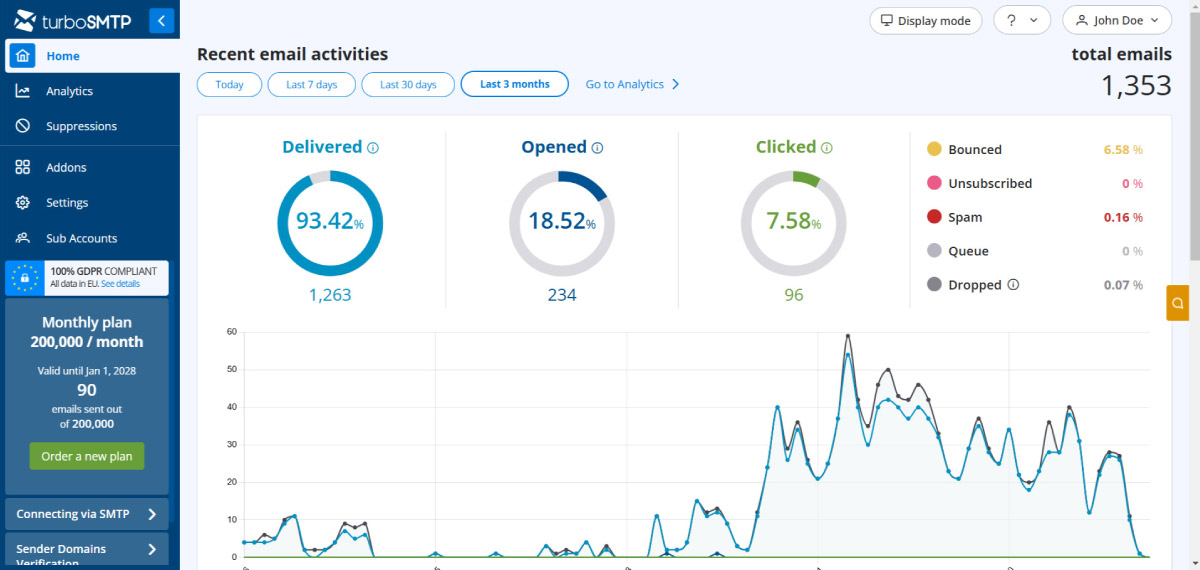
turboSMTP is a professional email delivery service that handles both transactional and bulk email API from a single account. It's been around since the early 2010s, which gives it a track record that most newer providers simply can't match, and a depth of ISP relationships that takes years to build.
Email API and integration
turboSMTP offers both an REST email API and a full SMTP relay, and both are first-class citizens. The SMTP relay isn't bolted on as an afterthought, which matters when your stack includes tools that can't make HTTP calls (WordPress, legacy PHP apps, Postfix, desktop email software, and so on).
The email sending API uses a clean REST endpoint ( https://api.turbo-smtp.com/api/v2/mail/send ) with Consumer Key and Consumer Secret authentication. You can send emails from virtually any language or framework: just POST a JSON payload and turboSMTP handles routing, delivery, and reporting.
Official SDKs are available on GitHub:
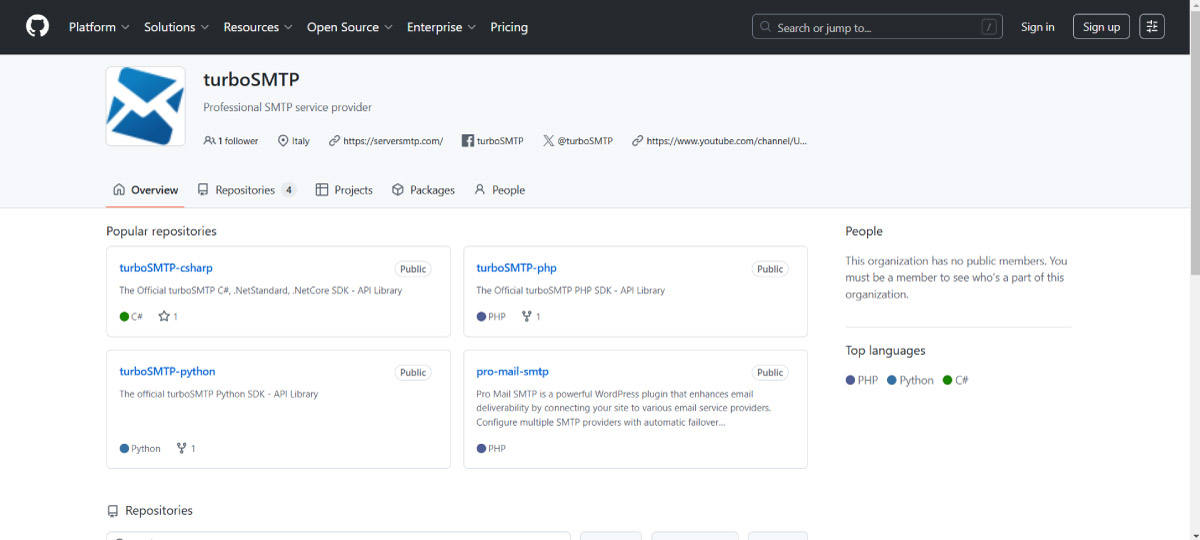
For other languages (like Node.js, Ruby, Go, Java) turboSMTP provides ready-to-use code examples in the API documentation that you can drop into your project. You can also explore all available SDKs and libraries for a deeper integration.
For WordPress email API integration, there's also a free WordPress SMTP plugin called Pro Mail SMTP with automatic failover and email tracking built in.
Here's how easy it is to send an email through turboSMTP's API. Pick your language, examples are available for all major stacks:
curl -X "POST"^
  "https://api.turbo-smtp.com/api/v2/mail/send" ^
  -H "accept: application/json" ^
  -H "consumerKey: <CONSUMER_KEY>" ^
  -H "consumerSecret: <CONSUMER_SECRET>" ^
  -H "Content-Type: application/json" ^
  -d ^
"{^
  ""from"": ""hello@your-company.com"",^
  ""to"": ""Doe.Jhon@gmail.com,contact@global-travel.com"",^
  ""subject"": ""New live training session"",^
  ""cc"": ""cc_user@example.com"",^
  ""bcc"": ""bcc_user@example.com"",^
  ""content"": ""Dear partner, we are delighted to invite you to an exclusive training session on UX Design. This session is designed to provide essential insights and practical strategies to enhance your skills."",^
  ""html_content"": ""Dear partner, we are delighted to invite you to an exclusive training session on UX Design. This session is designed to provide essential insights and practical strategies to enhance your skills.""^
}"
curl -X 'POST' \
  'https://api.turbo-smtp.com/api/v2/mail/send' \
  -H 'accept: application/json' \
  -H 'consumerKey:  <CONSUMER_KEY>' \
  -H 'consumerSecret: <CONSUMER_SECRET>' \
  -H 'Content-Type: application/json' \
  -d '{
  "from": "hello@your-company.com",
  "to": "Doe.Jhon@gmail.com,contact@global-travel.com",
  "subject": "New live training session",
  "cc": "cc_user@example.com",
  "bcc": "bcc_user@example.com",
  "content": "Dear partner,\nWe are delighted to invite you to an exclusive training session on UX Design. This session is designed to provide essential insights and practical strategies to enhance your skills.",
  "html_content": "Dear partner,\nWe are delighted to invite you to an exclusive training session on <strong>UX Design</strong>. This session is designed to provide essential insights and practical strategies to enhance your skills."
}'
curl.exe -X 'POST' `
  'https://api.turbo-smtp.com/api/v2/mail/send' `
  -H 'accept: application/json'  `
  -H 'consumerKey:  <CONSUMER_KEY>'  `
  -H 'consumerSecret: <CONSUMER_SECRET>'  `
  -H 'Content-Type: application/json' `
  -d @"
{
  \"from\": \"hello@your-company.com\",
  \"to\": \"Doe.Jhon@gmail.com,contact@global-travel.com\",
  \"subject\": \"New live training session\",
  \"cc\": \"cc_user@example.com\",
  \"bcc\": \"bcc_user@example.com\",
  \"content\": \"Dear partner,\nWe are delighted to invite you to an exclusive training session on UX Design. This session is designed to provide essential insights and practical strategies to enhance your skills.\",
  \"html_content\": \"Dear partner,\nWe are delighted to invite you to an exclusive training session on <strong>UX Design</strong>. This session is designed to provide essential insights and practical strategies to enhance your skills.\"
}
"@
using System.Text;
using System.Text.Json;

public class Program
{
    public static async Task Main(string[] args)
    {
        var consumerKey = "<CONSUMER_KEY>";
        var consumerSecret = "<CONSUMER_SECRET>";

        string url = "https://api.turbo-smtp.com/api/v2/mail/send";

        var mailData = new {
            from = "hello@your-company.com",
            to = "Doe.Jhon@gmail.com,contact@global-travel.com",
            subject = "New live training session",
            cc = "cc_user@example.com",
            bcc = "bcc_user@example.com",
            content = "Dear partner, we are delighted to invite you to an exclusive training session on UX Design. This session is designed to provide essential insights and practical strategies to enhance your skills.",
            html_content = "Dear partner, We are delighted to invite you to an exclusive training session on <strong>UX Design</strong>. This session is designed to provide essential insights and practical strategies to enhance your skills."
        }; // Mail Data setup.

        using (HttpClient httpClient = new HttpClient())
        {
            // JSON data seriaization
            var json = JsonSerializer.Serialize(mailData);
            var content = new StringContent(json, Encoding.UTF8, "application/json");

            // Set authentication headers
            content.Headers.Add("consumerKey", consumerKey);
            content.Headers.Add("consumerSecret", consumerSecret);

            // Trigger POST request
            using (var response = await httpClient.PostAsync(url, content))
            {
                if (response.IsSuccessStatusCode)
                {
                    var result = await response.Content.ReadAsStringAsync();
                    Console.WriteLine("Response: " + result);
                }
                else
                {
                    Console.WriteLine("Request error: " + response.StatusCode);
                }
            }
        }
    }
}
package main

import (
	"bytes"
	"fmt"
	"io/ioutil"
	"net/http"
)

func main() {
	// setup.
	url := "https://api.turbo-smtp.com/api/v2/mail/send"
	consumerkey := "<CONSUMER_KEY>"
	consumerSecret := "<CONSUMER_SECRET>"

	// Body Data.
	data := []byte(`{
		"from": "hello@your-company.com",
		"to": "Doe.Jhon@gmail.com,contact@global-travel.com",
		"subject": "New live training session",
		"cc": "cc_user@example.com",
		"bcc": "bcc_user@example.com",
		"content": "Dear partner,\nWe are delighted to invite you to an exclusive training session on UX Design. This session is designed to provide essential insights and practical strategies to enhance your skills.",
		"html_content": "Dear partner,\nWe are delighted to invite you to an exclusive training session on <strong>UX Design</strong>. This session is designed to provide essential insights and practical strategies to enhance your skills."
		}`)

	// Create POST Resquest.
	req, err := http.NewRequest("POST", url, bytes.NewBuffer(data))
	if err != nil {
		fmt.Println("An Error has occured:", err)
		return
	}

	// Set Request Headers.
	req.Header.Set("Content-Type", "application/json")
	req.Header.Set("accept", "application/json")
	req.Header.Set("consumerKey", consumerkey)
	req.Header.Set("consumerSecret", consumerSecret)

	// Perform HTTP Request.
	client := &http.Client{}
	resp, err := client.Do(req)
	if err != nil {
		fmt.Println("An Error has occured sending the request:", err)
		return
	}
	defer resp.Body.Close()

	// Read Server Response
	body, err := ioutil.ReadAll(resp.Body)
	if err != nil {
		fmt.Println("An Error has occured reading the server response:", err)
		return
	}

	// Print Server Response
	fmt.Println(string(body))
}
const https = require('https');

//setup credentials.
const consumerKey = '<CONSUMER_KEY>';
const consumerSecret = '<CONSUMER_SECRET>';

//setup body.
const sendData = {
    from: 'hello@your-company.com',
    to: 'Doe.Jhon@gmail.com,contact@global-travel.com',
    subject: 'New live training session',
    cc: 'cc_user@example.com',
    bcc: 'bcc_user@example.com',
    content: 'Dear partner,\nWe are delighted to invite you to an exclusive training session on UX Design. This session is designed to provide essential insights and practical strategies to enhance your skills.',
    html_content: 'Dear partner, <br>We are delighted to invite you to an exclusive training session on <strong>UX Design</strong>. This session is designed to provide essential insights and practical strategies to enhance your skills.',
};


//setup request options.
const options = {
    hostname: 'api.turbo-smtp.com',
    path: '/api/v2/mail/send',
    method: 'POST',
    headers: {
        'Accept': 'application/json',
        'Consumerkey': consumerKey,
        'Consumersecret': consumerSecret,
        'Content-Type': 'application/json',
    },
};

//perform http request
const req = https.request(options, (res) => {
    let responseData = '';

    res.on('data', (chunk) => {
        responseData += chunk;
    });

    res.on('end', () => {
        console.log('Response:', responseData);
    });
});

//handle request error.
req.on('error', (error) => {
    console.error('Error:', error.message);
});

//write response.
req.write(JSON.stringify(sendData));
req.end();
import http.client
import json

# setup credentials.
consumerKey = '<CONSUMER_KEY>'
consumerSecret = '<CONSUMER_SECRET>'

# setup body.
data = {
    'from': 'hello@your-company.com',
    'to': 'Doe.Jhon@gmail.com,contact@global-travel.com',
    'subject': 'New live training session',
    'cc': 'cc_user@example.com',
    'bcc': 'bcc_user@example.com',
    'content': 'Dear partner,\nWe are delighted to invite you to an exclusive training session on UX Design. This session is designed to provide essential insights and practical strategies to enhance your skills.',
    'html_content': 'Dear partner, <br>We are delighted to invite you to an exclusive training session on <strong>UX Design</strong>. This session is designed to provide essential insights and practical strategies to enhance your skills.'
}

# convert body to json.
data_json = json.dumps(data)

# setup headers
headers = {
        'Accept': 'application/json',
        'Consumerkey': consumerKey,
        'Consumersecret': consumerSecret,
        'Content-Type': 'application/json',
}

# Setup URL and endpoint
url = 'api.turbo-smtp.com'
endpoint = '/api/v2/mail/send'

# Create HTTP connection.
conn = http.client.HTTPConnection(url)

# Perform POST request.
try:
    conn.request('POST', endpoint, body=data_json, headers=headers)
    response = conn.getresponse()

    # Read Server response.
    response_data = response.read().decode('utf-8')
    print(response_data)

    # Close connection.
    conn.close()
except http.client.HTTPException as e:
    # Handle HTTP errors
    print('Error on HTTP request:', e)
except ConnectionError as e:
    # Handle Connection errors
    print('Error on HTTP connection:', e)
require 'net/https'
require 'uri'

# URL of the endpoint you want to send the POST request to
url = URI.parse('https://api.turbo-smtp.com/api/v2/mail/send')
consumerKey = "<CONSUMER_KEY>";
consumerSecret = "<CONSUMER_SECRET>";

# Data to send in the request body
data = {
    'from' => 'hello@your-company.com',
    'to' => 'Doe.Jhon@gmail.com,contact@global-travel.com',
    'subject' => 'New live training session',
    'cc' => 'cc_user@example.com',
    'bcc' => 'bcc_user@example.com',
    'content' => 'Dear partner,\nWe are delighted to invite you to an exclusive training session on UX Design. This session is designed to provide essential insights and practical strategies to enhance your skills.',
    'html_content' => 'Dear partner, <br>We are delighted to invite you to an exclusive training session on <strong>UX Design</strong>. This session is designed to provide essential insights and practical strategies to enhance your skills.'
}

# Create the HTTPS connection
http = Net::HTTP.new(url.host, url.port)
http.use_ssl = true

# Create the request object
request = Net::HTTP::Post.new(url.path)
request["Consumerkey"] = consumerKey
request["Consumersecret"] = consumerSecret
request["Content-Type"] = "application/json"
request["Accept"] = "application/json"

request.set_form_data(data)

# Send the request and get the response
response = http.request(request)

# Print the response body
puts response.body
<?php

$send_data = [
    "from" => "hello@your-company.com",
    "to" => "Doe.Jhon@gmail.com,contact@global-travel.com",
    "subject" => "New live training session",
    "cc" => "cc_user@example.com",
    "bcc" => "bcc_user@example.com",
    "content" => "Dear partner,\n We are delighted to invite you to an exclusive training session on UX Design. This session is designed to provide essential insights and practical strategies to enhance your skills.",
    "html_content" => "Dear partner,<br />We are delighted to invite you to an exclusive training session on <strong>UX Design</strong>. This session is designed to provide essential insights and practical strategies to enhance your skills."
];

$ch = curl_init();

curl_setopt($ch, CURLOPT_URL, 'https://api.turbo-smtp.com/api/v2/mail/send');
curl_setopt($ch, CURLOPT_RETURNTRANSFER, 1);
curl_setopt($ch, CURLOPT_POST, 1);
curl_setopt($ch, CURLOPT_POSTFIELDS, json_encode($send_data));

$headers = array();
$headers[] = 'Accept: application/json';
$headers[] = 'Consumerkey: <CONSUMER_KEY>';
$headers[] = 'Consumersecret: <CONSUMER_SECRET>';
$headers[] = 'Content-Type: application/json';
curl_setopt($ch, CURLOPT_HTTPHEADER, $headers);

$result = curl_exec($ch);
$http_code = curl_getinfo($ch, CURLINFO_HTTP_CODE);

if (curl_errno($ch)) {
    echo 'Error:' . curl_error($ch);
} else if ($http_code !== 200) {
    echo "Request error: ".$http_code;
} else {
    echo "Response: ".$result;
}
curl_close($ch);
import java.io.BufferedReader;
import java.io.DataOutputStream;
import java.io.InputStreamReader;
import java.net.HttpURLConnection;
import java.net.URL;

public class TurboSMTPMailExample {
    public static void main(String[] args) {
        try {
            // Specify the URL of the API endpoint
            URL url = new URL("https://api.turbo-smtp.com/api/v2/mail/send");

            // Specify Credentials
            String Consumerkey = "<CONSUMER_KEY>";
            String Consumersecret = "<CONSUMER_SECRET>";

            // Open a connection to the URL
            HttpURLConnection connection = (HttpURLConnection) url.openConnection();

            // Set the request method to POST
            connection.setRequestMethod("GET");

            // Set the request headers
            connection.setRequestProperty("Content-Type", "application/json");
            connection.setRequestProperty("Accept", "application/json");
            connection.setRequestProperty("Consumerkey", Consumerkey);
            connection.setRequestProperty("Consumersecret", Consumersecret);

            // Enable input and output streams
            connection.setDoInput(true);
            connection.setDoOutput(true);

            // Define the request body (as JSON)
            //String requestBody = "{\"from\": \"user@example.com\", \"to\": \"user@example.com,user2@example.com\", \"subject\": \"This is a test message\"}";

            String requestBody = "{" +
                                "\"from\": \"user@example.com\", " +
                                "\"to\": \"user@example.com,user2@example.com\", " +
                                "\"subject\": \"This is a test message\", " +
                                "\"cc\": \"cc_user@example.com\", " +
                                "\"bcc\": \"bcc_user@example.com\", " +
                                "\"content\": \"Dear partner. We are delighted to invite you to an exclusive training session on UX Design. This session is designed to provide essential insights and practical strategies to enhance your skills.\", " +
                                "\"html_content\": \"Dear partner,<br />We are delighted to invite you to an exclusive training session on <strong>UX Design</strong>. This session is designed to provide essential insights and practical strategies to enhance your skills.\" " +
                                "}";

            DataOutputStream outputStream = new DataOutputStream(connection.getOutputStream());
            outputStream.writeBytes(requestBody);
            outputStream.flush();
            outputStream.close();

            // Get the response code
            int responseCode = connection.getResponseCode();

            // Read the response from the server
            BufferedReader reader = new BufferedReader(new InputStreamReader(connection.getInputStream()));
            String line;
            StringBuilder response = new StringBuilder();
            while ((line = reader.readLine()) != null) {
                response.append(line);
            }
            reader.close();

            // Print the response
            System.out.println("Response Code: " + responseCode);
            System.out.println("Response Body: " + response.toString());
        } catch (Exception e) {
            e.printStackTrace();
        }
    }
}
Deliverability
turboSMTP uses white-listed, trusted servers with established ISP relationships, which directly translates into better inbox placement. Their infrastructure uses smart routing to adaptively optimize delivery paths, ensuring reliable performance as you scale.
For senders with higher volume needs, dedicated IPs are available on Professional and Enterprise plans. turboSMTP supports full SPF, DKIM, and DMARC authentication, the three DNS records that inbox providers like Gmail and Outlook require to trust your sending domain.The platform also includes a custom tracking domain feature, which lets you use your own domain for open and click tracking links instead of a shared one, a meaningful deliverability advantage, since inbox providers treat custom domains more favourably than shared tracking URLs.
Webhooks and observability
turboSMTP's webhook system covers nine event types across two categories.
- Delivery events include processed, dropped, delivered, deferred, and bounce.
- Engagement events cover open, click, unsubscribe, and spam report.
Each event payload includes a message ID, recipient email, subject, timestamp, and event-specific data (like the clicked URL or the bounce reason).
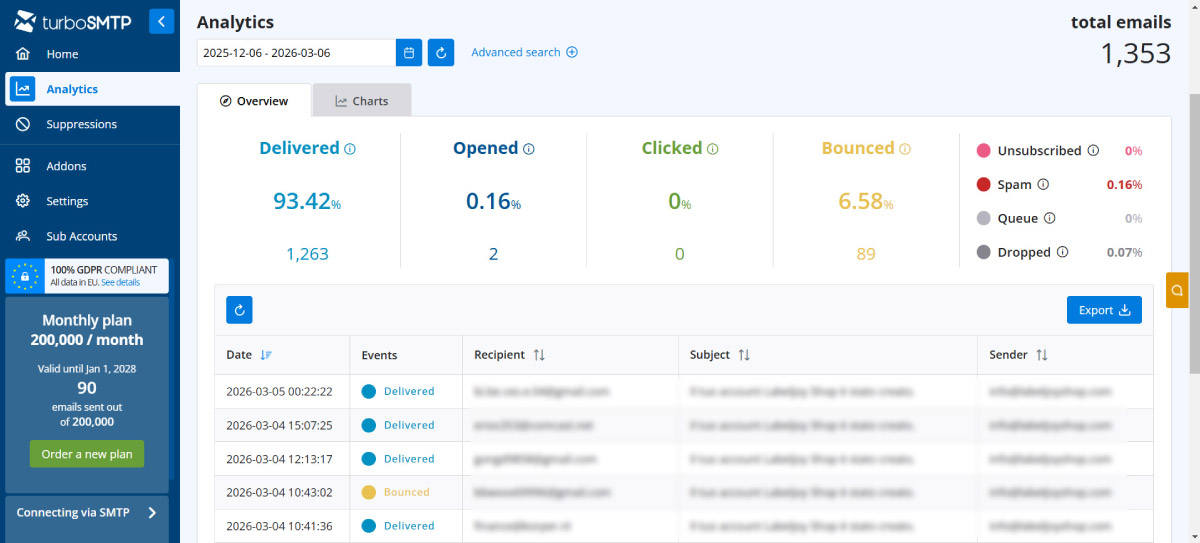
The analytics dashboard provides real-time click and open tracking, along with bounce, spam, and unsubscribe management, giving you full visibility into what happens to your emails after they leave your server.
Email validation tool: built in, not bolted on
✔️ turboSMTP includes a built-in email validation tool accessible from the dashboard on all account tiers. You can upload your contact list (CSV or TXT) and the system categorizes every address as valid, invalid, catch-all, spamtrap, abuse, disposable, or unknown, so you can clean your list before hitting send.
This prevents hard bounces and spamtrap hits at the source rather than after the damage is done. Professional and Enterprise plans include 3,000 validations per month at no extra cost; other plans can purchase validation credits separately.
FOR COMPARISON:
❌ Postmark doesn't offer any email validation tool.
❌ Resend doesn't either.
❌ SendGrid has one, but it's a paid add-on.
❌ Mailgun includes validation on paid plans.
❌ Amazon SES doesn't offer it at all.
Support: real humans, 24/7, in your language
This sounds like a small thing until you hit a deliverability problem at midnight before a product launch.
✔️ turboSMTP's support is available 24 hours a day, 7 days a week, in multiple languages (including English, Italian, French, Spanish, and German), and it's staffed by real people, not AI chatbots, not community forums, not a ticket queue with a 48-hour SLA.
Let's be specific about what the others offer, because "great support" is the most overused claim in SaaS:
❌ Resend: community-only support. No live agents unless you're on an enterprise plan. If you hit a deliverability crisis in production on a Saturday night, you're posting in a forum and hoping someone responds.
❌ Postmark: business-hours support. Solid when they're online, but email problems don't respect office hours.
❌ SendGrid: support quality depends entirely on your plan. Free and Essentials users report waiting days for ticket responses. Phone support requires higher-tier plans. Since the Twilio acquisition, recent TrustPilot reviews are predominantly negative, citing account suspensions without warning, slow support, and billing issues.
❌ Mailgun: support quality has been inconsistent through its multiple acquisitions (Rackspace → Pathwire → Sinch). Your experience depends on when you signed up and which support team you land on.
❌ Amazon SES: no live support at all without a paid AWS support plan, which starts at $29/month for 12-hour response times and goes up from there. For production-grade support, you're looking at $100+/month.
GDPR compliance
turboSMTP takes data protection seriously. The company has implemented GDPR-compliant practices including a nominated Data Protection Officer, Privacy by Design principles, data portability support, and documented breach response procedures. Reinforced protocols are in place for data transfers, and the platform supports SPF, DKIM, and DMARC authentication to protect sender identity.
turboSMTP at a glance
🔗 serversmtp.com · from $0 (6,000 emails/month free)
Best for:
Teams looking for the best email API that covers both transactional and marketing email without juggling two separate providers. The practical choice for anyone who wants professional delivery, built-in email validation, and live human support, all under one account with transparent pricing.
PROS
- Transactional and bulk from one account
- REST email API and full SMTP relay, both first-class
- Official SDKs on GitHub (C#, PHP, Python) + code examples for 8 languages
- WordPress SMTP plugin with automatic failover
- Dedicated IPs on Professional and Enterprise plans
- Email validation tool accessible on all plans (3,000/mo free on Professional+)
- Smart routing for optimized delivery
- Custom tracking domain
- Real-time analytics with click and open tracking
- 24/7 multilingual live human support
- Pay-as-you-go credits available
- GDPR-compliant with nominated Data Protection Officer
- Works seamlessly with SendBlaster and any SMTP client
CONS
- Smaller developer community than SendGrid
- Dashboard UI less polished than Resend
- Fewer third-party integration tutorials online
Postmark
Postmark launched in 2009 with a single-minded focus on transactional email, and they've kept that focus for over fifteen years. It was acquired by ActiveCampaign in 2022 but still runs as a standalone product. If your number one priority is getting password resets and receipts into the inbox as fast as humanly possible, Postmark is arguably the most battle-tested option for that specific use case.
The key architectural decision Postmark made early on was to completely separate transactional and bulk sending into distinct infrastructure. When a promotional newsletter triggers a spam complaint, it can't drag down the reputation of the IP pool handling your password resets. It's the right approach, and most of the industry has moved toward similar separation.
API design
Postmark's API is clean and well-documented. The request format is straightforward, SDKs cover all major languages, and the error messages are genuinely helpful. One notable gap: Postmark doesn't support idempotency keys, so you'll need to handle deduplication yourself if your client retries on network errors.
Javascript
// npm install postmark
const postmark = require('postmark');
const client = new postmark.ServerClient('SERVER_API_TOKEN');

await client.sendEmail({
  From:     'noreply@acme.io',
  To:       'jane@example.com',
  Subject:  'Your order has shipped',
  HtmlBody: '<p>Hi Jane — your package is on its way.</p>',
  MessageStream: 'outbound',
});
Limitations worth knowing
Postmark's email history is capped at 45 days. That's less than seven weeks of data. If you're running a deliverability audit, tracking down an intermittent issue, dealing with a customer complaint from two months ago, or need records for compliance, that cap becomes a serious constraint.
There's also no email validation API, which means you can't verify addresses at the point of collection, and you'll either need a third-party tool or accept a higher bounce rate. No native scheduled sends either. And there's no pay-as-you-go option: it's subscription-only, which means you're paying the same whether you send 1,000 or 10,000 emails in a given month.
Bulk/marketing email is technically supported, but it lives in a separate "Broadcasts" stream with separate pricing. If you need both transactional and marketing from one codebase, it can feel fragmented compared to providers that handle both natively.
The ActiveCampaign acquisition in 2022 hasn't broken Postmark, but it has visibly shifted the product's development trajectory. Features that developers have been requesting for years (email validation, longer log retention) remain unbuilt as the team's focus is partly on the broader ActiveCampaign ecosystem. For a product that built its reputation on laser focus, the divided attention is a concern.
Postmark at a glance
🔗 postmarkapp.com · from $15/month (100 emails/month free)
Best for:
teams where transactional email is the entire use case, delivery speed is the absolute top priority, and you don't need long-term log access, email validation, or flexible billing. If you also need bulk sending or marketing email, you'll need a second provider, which means a second bill and a second set of configurations.
PROS
- Industry-leading transactional delivery speed
- Separated transactional/bulk streams
- Excellent documentation
- 15+ years of track record
- Solid webhook event system
CONS
- Email history capped at 45 days
- No scheduled sends
- No email validation API
- Very limited free plan (100 emails/month)
- Subscription-only, no pay-as-you-go
- Marketing email requires separate stream and separate pricing
- Development pace slowed post-ActiveCampaign acquisition
- No blacklist monitoring
Resend

Resend is the newest provider on this list, founded in 2023, and built from the ground up for the modern developer stack. The API is clean and minimal. The dashboard is the most polished of any provider here. The standout feature is first-class support for React Email, you write your email templates as React components and render them server-side, which is a genuinely better authoring experience than hand-coding HTML tables or fighting with template engines.
If you're a developer evaluating email APIs for the first time, Resend will probably feel the best in the first 30 minutes. The question is what happens after those 30 minutes, when you're running production traffic and something goes wrong.
Javascript
// npm install resend
import { Resend } from 'resend';
import { OrderShippedEmail } from './emails/OrderShipped';

const resend = new Resend(process.env.RESEND_API_KEY);

await resend.emails.send({
  from:    'Acme <noreply@acme.io>',
  to:      'jane@example.com',
  subject: 'Your order has shipped',
  react:   OrderShippedEmail({ orderId: '1024', name: 'Jane' }),
  idempotencyKey: 'order-shipped-1024-jane',
});
Where Resend falls short
SMTP support exists but is explicitly not recommended for high-volume use, the product is clearly REST-first. This means tools that rely on SMTP configuration (including many WordPress setups, legacy applications, and desktop email clients) won't get the best experience.
There are no dedicated IPs on lower tiers (available as an add-on from the Scale plan), no email validation tool, and, most notably, support is community-only on Free and Pro plans. No phone, no chat, no ticket queue with an SLA. Slack support starts at the Scale plan ($90/month). If you hit a deliverability crisis in production on a Friday evening and you're on a lower plan, you're posting in a community forum and waiting.
Resend also has the youngest infrastructure of any provider here. The company was founded in 2023, which means roughly two to three years of ISP relationship-building, compared to 15+ years for Postmark and turboSMTP. ISP relationships are how providers negotiate better inbox placement, resolve blacklisting issues, and maintain high delivery rates. You can't rush that. For side projects and early-stage MVPs, this probably won't matter. For high-volume production sending where your sender reputation took years to build, it's a real consideration.
Resend at a glance
🔗 resend.com · from $0 (3,000 emails/month free)
Best for:
Developer-heavy teams building brand-new applications, especially those already deep in the React ecosystem. A good fit for startups and SaaS products where developer experience matters above everything else. Not the right choice if you need live support, long log retention, or the peace of mind that comes with mature infrastructure.
PROS
- Best-in-class developer experience
- React Email integration (JSX templates)
- Clean, modern REST API
- Idempotency keys supported
- Scheduled sends
- Multi-region sending
- Transactional and marketing email supported
CONS
- SMTP not recommended for production use
- Community-only support on Free and Pro plans
- No email validation tool
- Youngest infrastructure on this list (~2-3 years)
- Dedicated IPs only as add-on from Scale plan
- Limited log retention (1 day free, 3 days Pro, 7 days Scale)
SendGrid (Twilio)
SendGrid is one of the oldest and the largest provider on this list. Founded in 2009, acquired by Twilio in 2018, it now processes billions of emails per month across hundreds of thousands of customers. On paper, SendGrid has everything: marketing and transactional on one platform, multi-channel messaging via Twilio, deep analytics, and the largest ecosystem of integrations.
The reality is more complicated. Since the Twilio acquisition, SendGrid has become a different product, bigger, more complex, and by many accounts, harder to use and harder to get help with.
What SendGrid does well
Marketing and transactional email on one platform, with dedicated IP pools for each. A powerful template engine with versioning. An Email Validation API (paid add-on). Solid analytics and a deliverability insights dashboard. The Twilio integration means you can combine email with SMS, WhatsApp, and voice from a single API account, useful if you're building multi-channel communications.
What's changed since the Twilio acquisition
The dashboard and configuration surface have grown to a point where onboarding is genuinely overwhelming, especially for developers who just want to send transactional email quickly. Documentation is extensive but sometimes inconsistent across API versions.
Support quality has become a real pain point. Free and Essentials users regularly report waiting days for ticket responses. Phone support requires higher-tier plans. Recent reviews paint a concerning picture: users report sudden account suspensions without clear explanation, slow reinstatement processes, and difficulty reaching anyone who can actually help. To be fair, enterprise customers typically report better experiences, but enterprise pricing starts well north of what most small and mid-size teams can justify.
Pricing also adds up quickly. Email validation is a paid add-on. Dedicated IPs require higher-tier plans. The features you see advertised on the homepage often live behind plan upgrades, which can make the actual cost significantly higher than the starting price suggests.
SendGrid at a glance
🔗 sendgrid.com · from $19.95/month (100 emails/day free)
Best for:
Enterprises or large teams that need a full-stack email + messaging platform, have the budget for higher-tier plans (where support is better), and are willing to invest significant time in setup and configuration. Less ideal for small teams, startups, or anyone who wants to get started quickly without navigating a complex pricing structure.
PROS
- Largest scale and infrastructure in the space
- Marketing + transactional on one platform
- Multi-channel via Twilio (SMS, WhatsApp)
- Deep analytics and deliverability insights
- Extensive third-party integrations
CONS
- Complex UI, steep learning curve
- Support quality inconsistent, especially on lower tiers
- Users report account suspensions and slow support
- Email validation is a paid add-on
- Costs escalate quickly with add-ons and plan upgrades
Mailgun (Sinch)
Mailgun has long been a developer favourite, especially for its inbound email parsing, a feature that lets you receive emails and route them to your application via webhooks. This is a genuinely differentiated capability: if your product needs to process replies, handle support tickets submitted by email, or manage any kind of inbound flow, Mailgun is one of the few providers that treats it as a first-class feature.
The acquisition history matters
Mailgun has been through three ownership changes: Rackspace built it, sold it to Pathwire, which was then acquired by Sinch. Each transition brought changes in team, priorities, and product direction. The result is a service that's technically capable but has suffered from inconsistent support quality and unclear product roadmap over the years.
Some users report that deliverability has declined post-acquisitions, though experiences vary. If you're evaluating Mailgun today, it's worth testing deliverability with your own domains rather than relying on historical reputation.
Limited free tier
Mailgun offers a free plan, but it's capped at 100 emails per day, far more restrictive than most competitors. Paid plans start at $15/month (Basic, 10,000 emails), with the more feature-rich Foundation plan at $35/month. For teams that want to run a proper high-volume evaluation before committing, the daily cap on the free tier can be limiting.
Mailgun at a glance
🔗 mailgun.com · from $0 (100 emails/day free) · paid plans from $15/month
Best for:
engineering teams that specifically need inbound email handling alongside outbound, or that need maximum API flexibility for custom email workflows. If inbound parsing isn't a core requirement, other providers on this list offer better value and more predictable long-term stability.
PROS
- Best-in-class inbound email parsing
- Flexible, well-documented API
- Inbox Placement testing feature
- Email validation API available
- 99.99% uptime SLA
CONS
- Support quality inconsistent across three ownership changes
- Very limited free tier (100 emails/day)
- Can be complex for non-developers
- Deliverability concerns reported by some users post-acquisitions
- Product roadmap uncertain under Sinch ownership
- Marketing email requires separate Mailjet product
- Log retention limited to 30 days
Amazon SES
Amazon SES is the cheapest option on this list by a wide margin, roughly $0.10 per 1,000 emails, with no monthly minimums. If you're already inside the AWS ecosystem and have the technical resources to set it up properly, the cost savings at scale are real and significant.
But here's the thing about SES that gets lost in the pricing conversation: SES is raw infrastructure, not a managed service. The per-email cost is low, but the total cost of ownership is much higher than the price tag suggests.
The hidden cost of "cheap"
With SES, everything that other providers handle for you becomes your responsibility: SPF, DKIM, and DMARC configuration. IP reputation management. Bounce and complaint handling. Deliverability monitoring. Blacklist checking. Suppression list management.
There's no DNS wizard, no built-in email validation, no marketing tools, and no live support unless you pay for an AWS support plan, which starts at $29/month for developer support (12-hour response time) and goes to $100+/month for business support. SES does offer a Virtual Deliverability Manager (VDM) with dashboards and reputation monitoring, but it's a paid add-on at $0.07 per 1,000 emails, which effectively raises your sending cost by 70%. Factor all that into your cost comparison, and the price gap with managed providers narrows significantly.
The AWS console is functional but notoriously unfriendly. Daily sending limits are imposed on new accounts until you request production access, a process that can take days. And when things go wrong, you're navigating AWS documentation and support ticketing, which is designed for infrastructure engineers, not email marketers.
Teams that switch to SES from a managed provider often underestimate the ongoing operational burden of managing deliverability. The first month feels like savings; the third month feels like a second job.
Amazon SES at a glance
🔗 aws.amazon.com/ses · ~$0.10/1,000 emails + AWS support plan
Best for:
Technical teams already deep in AWS who have dedicated infrastructure engineers capable of managing deliverability, and where cost at extreme volume (millions of emails/month) is the deciding factor. Not recommended for teams without in-house deliverability expertise, the money you save on per-email cost, you'll spend on troubleshooting.
PROS
- Cheapest per-email cost at scale
- Highly reliable AWS infrastructure
- No monthly minimums, pure pay-as-you-go
- Deep AWS ecosystem integration (Lambda, SNS, S3)
CONS
- Significant setup and ongoing ops burden
- No managed deliverability tooling unless you pay for VDM add-on (+$0.07/1,000 emails)
- No email validation
- No marketing tools
- No live support without paid AWS plan ($29–$100+/month)
- No blacklist monitoring
- Daily sending limits until account approved (can take days)
- Console UX designed for infra engineers, not email teams
- Total cost of ownership much higher than per-email price suggests
How to pick the right one for your use case
There's no single "best email API", there's the one that fits your situation. Here's how to think about it:
You need both transactional and marketing email.
This is the most common real-world scenario, and it's where turboSMTP stands out. You get both transactional and bulk/marketing email from a single account, one set of DNS records, one dashboard, one billing relationship. The alternative is paying for two separate tools, which means double the configuration and double the points of failure.
You care about GDPR compliance.
All providers on this list offer some form of GDPR compliance. turboSMTP stands out with a nominated Data Protection Officer, Privacy by Design practices, and documented data breach response procedures. If strict EU data residency is a requirement, verify each provider's server locations and DPA terms before committing.
You want professional support without enterprise pricing.
turboSMTP is the only provider on this list that offers 24/7 live human support in multiple languages starting from the free tier. Every other provider either restricts support to paid plans, offers business-hours-only coverage, or relies on community forums. When email is mission-critical to your business, this isn't a nice-to-have.
Transactional speed is everything and bulk doesn't matter.
Postmark is the gold standard for transactional delivery speed, 15+ years of focused infrastructure. Accept the tradeoffs (45-day log cap, no email validation, no pay-as-you-go) and you get what is arguably the fastest transactional delivery on the market.
You're building a new app and developer experience matters most.
Resend has the best DX on this list. If your team writes React and wants to build email templates the same way it builds UI, nothing else here comes close. Accept the tradeoffs: community-only support on lower plans, youngest infrastructure.
You're deep in AWS and cost at scale is everything.
Amazon SES, if your team can handle the operational burden. Be honest about whether you have the in-house expertise to manage deliverability, and factor in the real total cost (AWS support plan, VDM add-on, engineering time, third-party tools you'll need to bolt on).
You need inbound email processing.
Mailgun, but go in with realistic expectations about support consistency and long-term product direction given the multiple ownership changes.
One last thing
Whichever provider you choose, set up SPF, DKIM, and DMARC before sending a single production email. These three DNS records are the foundation of inbox placement, no amount of provider quality makes up for missing authentication.
And remember: the best email API isn't the one with the most features on a comparison table. It's the one that reliably delivers your emails to the inbox, gives you the data to understand what's happening, and has someone available to help when things go wrong. By those criteria, we think turboSMTP is the strongest all-around choice, but we're biased, and we've told you that upfront. Test it yourself. That's all we ask.
Frequently asked questions about email APIs
What is the best email API for developers?
For most teams, turboSMTP is the strongest all-around choice: it handles both transactional and bulk email from a single account, includes a built-in email validation tool, and offers 24/7 live human support in multiple languages — even on the free tier. That said, if you have a very specific need, other providers may be a better fit: Postmark for raw transactional speed, Resend for React-based developer experience, or Amazon SES for cost at extreme scale.
What is the difference between an email API and SMTP?
An email API lets you send emails via HTTP requests (REST calls), while SMTP is a protocol that requires configuring a mail server connection. Both achieve the same result (delivering email) but an API is generally easier to integrate into modern applications, while SMTP works better with legacy tools, desktop email clients, and platforms like WordPress. Most providers, including turboSMTP, offer both.
How much does an email API cost?
Pricing varies widely. turboSMTP starts with a free tier of 6,000 emails per month, with paid plans from $14.95/month. Postmark starts at $15/month. Resend offers 3,000 free emails per month, then $20/month. SendGrid starts at $19.95/month. Mailgun offers 100 free emails per day, with paid plans from $15/month. Amazon SES charges roughly $0.10 per 1,000 emails but requires additional spend on support and add-ons.
Do I need a dedicated IP for sending emails?
Not always. Shared IPs work fine for most senders with moderate volume. Dedicated IPs become important when you're sending at high volume and want full control over your sender reputation. Most providers offer dedicated IPs on higher-tier plans, turboSMTP includes them on Professional and Enterprise plans.
What is email API integration?
Email API integration is the process of connecting an email delivery service to your application so it can send emails programmatically. This typically involves generating an API key or credentials, making HTTP requests to the provider's endpoint, and handling responses and webhook events. Most providers offer SDKs and code examples to simplify the process.
Can I use an email API with WordPress?
Yes. Most email API providers offer an SMTP relay that works with WordPress SMTP plugins. turboSMTP also offers its own free WordPress plugin, Pro Mail SMTP, with automatic failover and email tracking built in.