website

Archive for the 'Tools' Category

7 Books To Enhance Your Email Marketing Skills

Email Marketing blogs are a precious source for information and discussion. They are the simplest way to keep updated with the latest trends and current best practices.
If you are directly involved in email marketing activities and truly want to enhance your skills, it is also a good idea to spend some time reading printed books!
In the last months some really useful books have been published about email marketing.
Here below you find our selection of must-read books about email campaigns, effective newsletters, and much more.

1. The Truth About Email Marketing
by  Simms Jenkins

“Industry expert, Simms Jenkins, provides a set of best practices to help you assess and refine your strategy and tac tics. Your orga nization can gain much from new and proven approaches to email marketing: strengthen cus­tomer relation ships, create loyalty, and build trust and awareness. The result is increased responses in sales, leads, registrations, and more.”

Continue reading ’7 Books To Enhance Your Email Marketing Skills’

What’s new on SB2 – SendBlaster Plugins

SendBlaster Plugins

SendBlaster 2 comes with dozens of enhancements and new features. In today’s post, we’d like to focus on SendBlaster Plugins.
We can define them as small external utilities that can be launched from inside SendBlaster’s user interface, in order to add new features to the program.  In other words, they represent an endless opportunity to customize and enhance SendBlaster in a very simple manner.

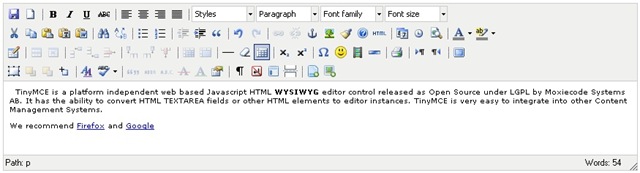
The first SendBlaster plugin, already available in SB2, is named  “Advanced HTML Editor“. It’s an additional HTML editor that supports DOM and CSS, it allows working with tables and editing many objects and properties.

In order to install it :

1. Go to “Advanced Settings” panel
2. Click on “More plugins” in the “Plugins” section: SendBlaster Plugins page will open on a new page.
3. Click on “Install”  button
4. Confirm it (run the .msi file)
5. Restart SendBlaster.

Please note that you can enable or disable any plugin from SendBlaster’s “Advanced Settings” panel. In order to completely remove a plugin, you must uninstall it from Windows Control Panel.

This is just the beginning though, expect many more SendBlaster plugins in the futureTheir API are public and third party developers will be encouraged to create new, useful plugins.

New! Track Your Email Campaigns and Measure Their Effectiveness With Trackreports

Trackreports

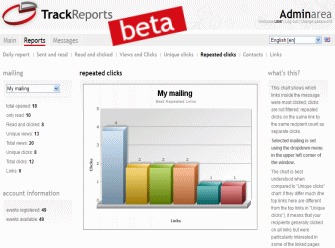
SendBlaster 2 is packed full of new and exciting features that long time users have craved.  This time, let’s talk about Trackreports.  What’s that stuff? It’s a new email tracking campaign service that helps you keep the track of every single email sent with SendBlaster: it will track opens, clicks, and calculate the response rate for every email campaign you run.  It means you will be able to measure the effectiveness of your email campaigns, by understanding which mailings your customers are most interested in and which not. In real time!

In order to start tracking your mailing, just press TrackReports button in SendBlaster’s message editing panel:

1. Compose your message and insert links
2. Once you’ve finished, connect to the Internet (if you are not already connected) and click on TrackReports button
3. Enter your TrackReports account (you need to register if you don’t have an account already)
4. Enter a new, unique title for your mailing or choose an existing one
5. Watch monitored stats in the TrackReports panel

Continue reading ‘New! Track Your Email Campaigns and Measure Their Effectiveness With Trackreports’

The Importance of Colors in Email Campaigns

colorsThe choice of color scheme for your emails should never be left to chance.
Indeed, using email templates made up of colors completely different from those used on your website or your logo could create problems for the cohesiveness of your brand identity.
Luckily, with a little care, this danger is easily avoided. Above all, color should not be over-used. An overly colorful newsletter can appear unprofessional and may jeopardize user-friendliness. It is best to stick to your brand or web-site’s characteristic colors. This will make your emails instantly recognizable to your readers, helping to preserve your brand identity.
If you are unsure of which color codes to use in your template, there are a number of trustworthy (free) on-line services that can recognize the exact color code of any on-line element. Here’s our selection of the best.

Continue reading ‘The Importance of Colors in Email Campaigns’

Make Your Emails Go Viral on Twitter

viral-mktgOne of the most popular use of Twitter is to post messages that repeat some information previously tweeted by another users. We are talking about ReTweets, a sort of  compliment you can get on Twitter by sharing interesting content.

At the moment the most popular tool to retweet is the Tweetmeme. Using the TweetMeme Buttons you can discover new content and easily tweet about it.
They work great on any web page (websites, blogs..), but there’s more! In few steps you can easily embed them into your emails too.

Why add a retweet link to your emails?
Because it’s a great way to drive more traffic and backlinks to your business. When your readers retweet your newsletter all their followers will see it, and they will be able to retweet it again, and so on. Then all these users could visit your Twitter account (RT@yourusername) or click on the url address and go to your email.

Continue reading ‘Make Your Emails Go Viral on Twitter’

What Is Your Email Reputation?

email reputation A good habit to follow before sending your bulk email is to look up the IP reputation of your SMTP service.
IP reputation is the major contributor to delivery rates, especially if you are sending to the largest ISP’s, e.g. Yahoo!, AOL, Hotmail. Statistics show that 83% of the time, sender reputation is the real cause of filtering: by monitoring it you will be able to identify problems affecting your sender reputation, determine the causes, and fix them.

Here are some of the major metrics ISPs look at when managing the message sent into their system:
- volume of emails (illegitimate bulk mail do normally trigger spam filters)
- spamtraps hits (old inboxes that ISPs reactivate specifically to trap spammers )
- invalid address rates (hard bounces)
- complaints rates (how often recipients hit the “report spam” button to response to your message)

The good news is that there are some online services that let you check your IP reputation. We recommend these four Free ones:

Continue reading ‘What Is Your Email Reputation?’

Web 2.0: 5 Cool E-mail Tools

emailDo you want to give more power to your email?  We selected 5 Free tools that will allow you to discover new ways to use it.

Moomeo – Just launched. It allows people to share emails. You send an email to Moomeo service email address, receive a Moomeo link to you email back, and share it on Twitter, Facebook, or anywhere online.

Voice on the Go – This service allow to listen to, compose, forward and delete your emails by voice, all without typing. No software to download. It works from any mobile phone on any network. Nice video demostration.

Feed My Inbox – Only 3% of computer users are familiar with how feeds work. FeedMyInbox makes it simple and provides you the feeds (RSS, XML, Atom) of your favorite blogs, news and sites directly to your E-mail inbox.

Zemanta – In real-time, while you type your blog posts or emails Zemanta suggest tags, links, photos, and related articles. Zemanta supports Wodpress, Blogger, TypePad, Movable Type, Ning, Drupal, LiveJournal, Tumblr and email platforms Google Mail and Yahoo!Mail.

Mailbeans – Mailbeans is a web-based service of email aggregation and management which allows users to keep all their email accounts on the web in a same place. It differs form usual webmail services both in the technological approach to email management as well as in the UI paradigm.


Load Times Plugin made by Cheap Web Hosting