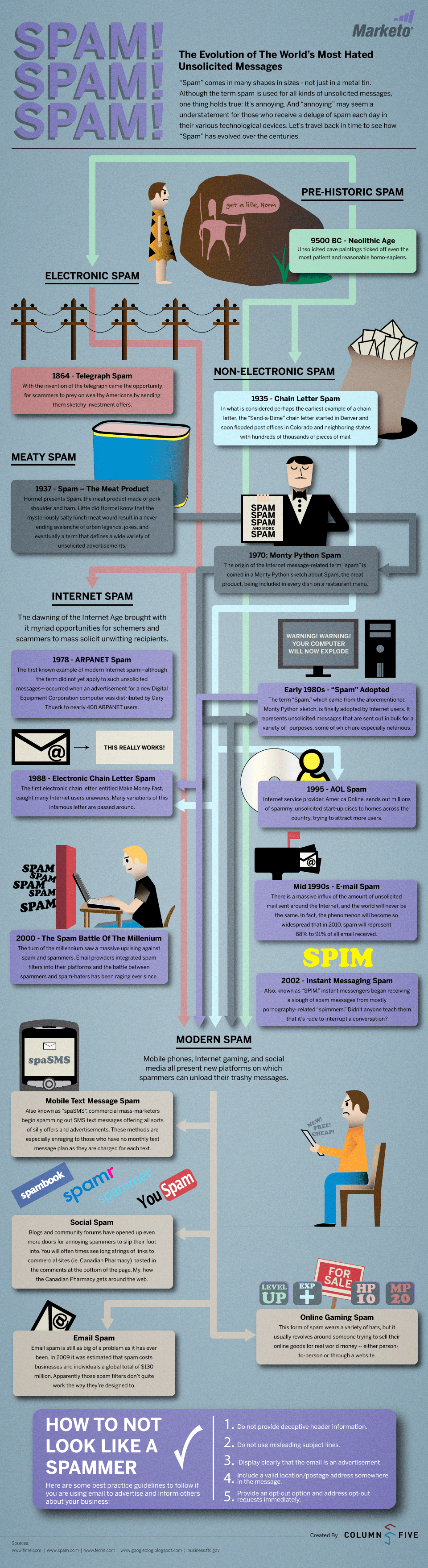
Enjoy this cool infographic displaying the evolution of spam. Be sure to scroll down to the bottom …you’ll find 5 useful tips on how to not look like a spammer.
Via | Marketo
Making Email Marketing Simple and Effective
Enjoy this cool infographic displaying the evolution of spam. Be sure to scroll down to the bottom …you’ll find 5 useful tips on how to not look like a spammer.
Via | Marketo
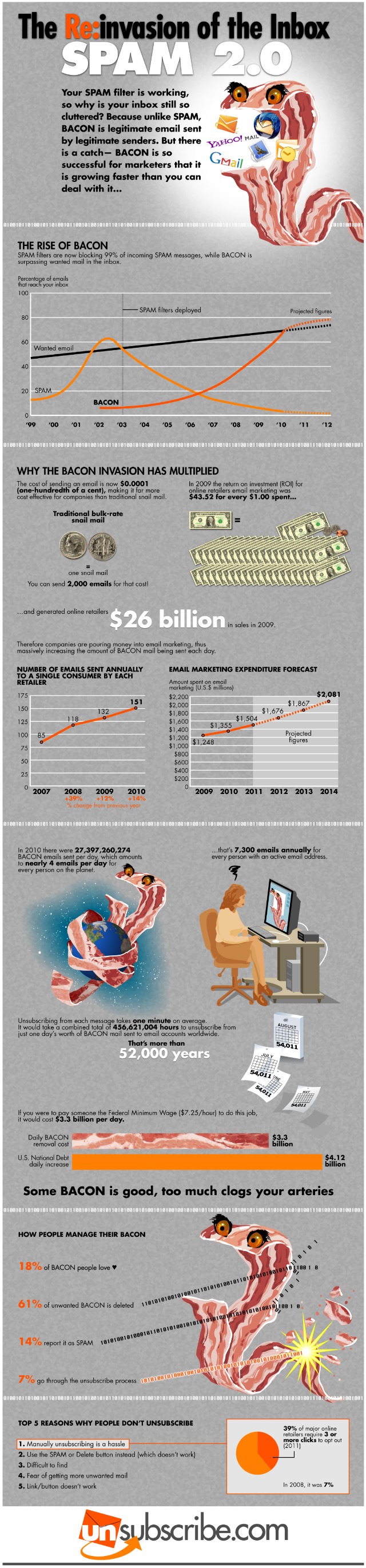
Did you know that spam has a more legitimate cousin called “bacon” (or bacn)?
By definition, bacn is solicited email notifications. The term – originally coined in August 2007 at PodCamp Pittsburgh 2 – refers to solicited messages that seemed as invasive in a users inbox as spam. For example bacon is the Twitter updates, Facebook notifications, Google Alerts and email confirmations for new accounts.
They are all notifications that we wait for, but they actually are not as important as the email from your friends, collegues, sons, etc.
According to the infographic below – designed by Unsubscribe.com – spam filters are now blocking 99% of incoming spam messages, while bacon is surpassing wanted email in inbox. In 2010 there were over 20 billions bacon emails sent per day, that’s 7.300 emails annually for every person with an active email address. A huge annoying invasion of the inbox.
But spam and bacon are totally different so you should treat them differently.
If you no longer want your bacon, do not mark it as spam! Unsubscribe from it.
Many legitimate senders face an increasing challenge of being designated as spam, even from their opt-in subscribers. People are being inundated with email and may inadvertently designate your emails as spam because they forgot that they have previously opted-in to receive your communications. In other cases, recipients may find it difficult to locate your unsubscribe link and simply find it easier to click the spam designation to remove you from their inbox.
For legitimate senders, it is important that you understand that subscriber behavior can be unpredictable and irrational at times. What was a conscious opt-in action one day can randomly turn into an unconscious spam action the next. The consequence of these actions is that it damages your IP reputation with the ISPs and if repeated, can lead to more drastic results that include delays, blocks and blacklisting.
Here are three best practices for senders to consider:
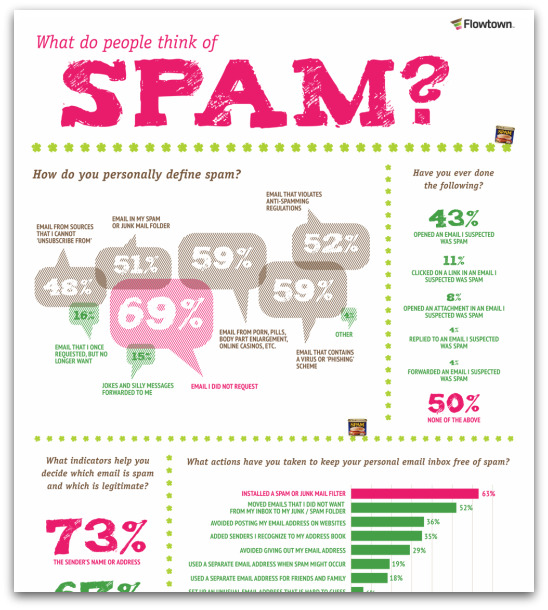
The folks at Flowtown put together this awesome infographic detailing a variety of stats around people’s perceptions of spam. Click on the image to view the full-sized version.
The data for the infographic comes from the: Ipsos Public Affairs 2010 MAAWG (Messaging Anti-Abuse Working Group ) E-Mail Security Awareness and Usage Report.
You can access a summary of the surey report data used in here. [pdf]
Source: Flowtown
These days, the majority of email servers have an automatic spam filtering service. These spam filters are quite intelligent, but sometimes they can make mistakes and delete (or send to the spam box) completely valid emails. This is a very common problem, particularly with free or low cost email accounts. If you think that a lot of your emails are being filtered into the spam box by mistake, here are some simple tips to follow to avoid being classified as a spammer:
1. Always include a “pure text” section: even if they are written in an HTML format, personal emails always automatically include a section of pure text. If they don’t, the majority of spam filters flag them up as suspicious. After you have finished writing an email, use the SendBlaster “HTML Text” button to automatically create a pure text section from the HTML code.
2. Write, don’t draw: the main body of the message must be text. Avoid inserting too many images or images which make your email too large. Once again, spam filters can become suspicious if there appears to be more image than text.
Continue reading ‘You’re not a spammer, so don’t let your emails get blocked by mistake!’
Publishing your email addresses in plain text on public sites is not safe anymore. Spam robots and spammers regularly scan forums, blogs, etc to collect new emails and to add them to their lists.
For webmasters and bloggers the best solution remains to hide email addresses by using a website form. Visitors can contact them by submitting the form that will be forwarded via email.
For all users a good way to avoid spam is to insert additional text into the email address like myname@DELETE-THISmydomain.com. Or trying to hide the real email typing like myname AT mydomain DOT com. These are good tricks but not 100% safe: today some clever spam bots are able to reveal them quite easily.
Scr.im is able to solve this issue by giving the best effective way to share your email without the pain of being an “easy spam target”.
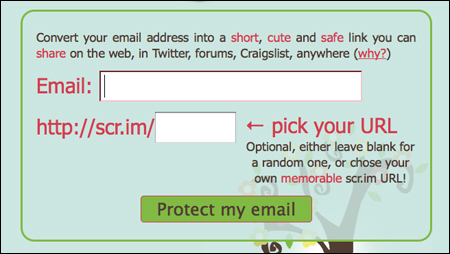
Scr.im is a free service that will convert your email address into a safe and short link you can share on the web, in forums, Twitter, Craiglist, etc.

To use this nice tool you need to type your real email address into the front page. The service either creates a Scr.im URL for you or you can type in your favorite suffix. For instance markus@email.com > http://scr.im/markus
Once the short url is activated you can post it anywhere. And when people want to send you a message they will need to pass a captcha, “a quick humanity check“, in order to see your real email address.
Simple, safe and free. We love it!
According to a recent survey promoted by MarketingSherpa most consumers don’t correctly comprehend the term “spam”: 56% consider marketing messages from known senders to be spam if the message is “just not interesting to me.” But there’s more. Regarding the use of the “report spam” button – the primary tool that internet service providers (ISPs) provide readers to counter spam – nearly half of respondents (48%) provided a reason other than “did not sign up for email” for reporting an email as spam.
Confusion is pervasive among consumers regarding what they believe will happen as a result of clicking the “report spam” button:
* Over half of respondents, 56%, reported that it will “filter all email from that sender.”
* 21% said it will notify the sender that the recipient did not find that specific email useful so the sender will “do a better job of mailing me” in the future.
* 47% said they would be unsubscribed from the list by clicking “report spam,” whereas 53% do not think that’s the case.
Continue reading ‘“This is spam” is not a substitute for “Unsubscribe”’
Load Times Plugin made by Cheap Web Hosting