website

Monthly Archive for May, 2011

Put a Valid Physical Postal Address in Your Commercial Emails

Did you know the CAN-SPAM Act requires that email senders must clearly tell recipients where they are located?
Whether you are sending bulk mail or commercial messages you MUST include your valid physical postal address.

If you work in a home office and you do not want to reveal your private street address, register a PO box with the US Postal Service or get a private mailbox with a commercial mail receiving agency established under Postal Service regulations.

SendBlaster do not automatically place any element into your templates. So, make sure you include your postal address at the very bottom of each outgoing message before hitting the “send” button.
It takes just a few seconds to act within the law!

Please note that violations of this CAN-SPAM Act requirement are subject to penalties of up to $16,000.

3 Differences Between Email Marketing and Social Media Marketing (and One Important Similarity)

Email marketing and social media marketing can appear fairly similar. Both deliver messages directly to leads who have expressed an interest in a company’s products. Both function online. And both are known to produce handsome rewards when done properly.

But those similarities are fairly superficial. There are actually a number of important differences between social media marketing and email marketing — and one vital point of similarity.

Email Lists Are Easily Segmented
List segmentation is one of the most important ingredients of effective email marketing. It ensures that the right messages meet the right audiences, reduces unsubscribes, raises conversion rates and helps to make sure that your emails are welcomed, read and acted upon.
None of that is really possible with social media where everyone receives the same message, regardless of the nature of their interest.

Continue reading ’3 Differences Between Email Marketing and Social Media Marketing (and One Important Similarity)’

5 Things to Do Soon After Sending your Newletter

…so you have just hit the “send” button. It may take a few minutes or even hours to send out your newsletter to your mailing list. Here is what you can do while waiting:

1. Check your email addresses
If you have added one or more email addresses that you own to your list (that’s a good practice!), verify what your emails look like on both webmail and email clients. Check junk/spam folders to make sure your emails do not end up in those folders. It may sound obvious but…be sure also to check your email subject line!

2. Inform your colleagues
It might also be useful to send your newsletter or DEM to team members, or to other company departments, in order to keep your colleagues updated on the campaign’s marketing activities.
This may avoid the risk of two or more corporate functions providing clients with different information.

3. Start monitoring bounces
Make sure bounces are limited (or, even better, that there are none) and that they represent a small percentage of the emails sent up to that point. This check may be very useful, since if the percentage of bounces is very high, clearly something is wrong.

4. Check delivery stats
If you have a dedicated smtp service, or any other service allowing you to monitor sent emails, you may want to check delivery status and speed. Some services will even alert you in real time when an email is opened.

5. Take a break
In all likelihood, the tension, stress, or fear of making mistakes you have accumulated in the past 5 minutes may overshadow the next 5 months…Well, it’s time to leave your desk and go look for that well-deserved cup of coffee. Or maybe this is the point where you realize you’ve made some awful blunder – in that case, the break will have to wait…

Related post: Stop and think before you hit “send”

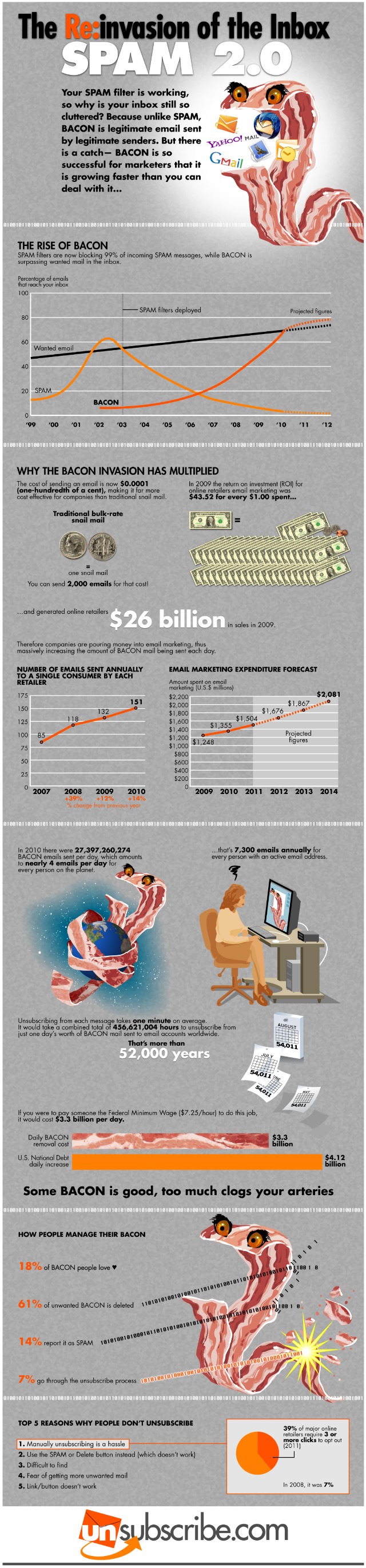
The Bacon Invasion [Infographic]

Did you know that spam has a more legitimate cousin called “bacon” (or bacn)?
By definition, bacn is solicited email notifications. The term – originally coined in August 2007 at PodCamp Pittsburgh 2 – refers to solicited messages that seemed as invasive in a users inbox as spam. For example bacon is the Twitter updates, Facebook notifications, Google Alerts and email confirmations for new accounts.
They are all notifications that we wait for, but they actually are not as important as the email from your friends, collegues, sons, etc.

According to the infographic below – designed by Unsubscribe.com – spam filters are now blocking 99% of incoming spam messages, while bacon is surpassing wanted email in inbox.   In 2010 there were over 20 billions bacon emails sent per day, that’s 7.300 emails annually for every person with an active email address.  A huge annoying invasion of the inbox.

But spam and bacon are totally different so you should treat them differently.
If you no longer want your bacon, do not mark it as spam! Unsubscribe from it.

Tips to Make Your Emails Accessible

It’s a given that email marketing can help you to build strong relationships with your subscribers.
This happens when you write good content and give your readers valuable information that helps them to achieve their goals. On top of that, you should make sure that all your emails are accessible to anyone.

Your list may include people with visual impariments or aging users:  why should they be excluded? It only takes a little effort to make sure that you are sending accessible emails.

Here are some tips and techiques for making them as accessible as possible:

  • Provide a link to a plain text or Rich Test version of your email.
  • Add alternative text when including images in your email.
  • Use fonts easy to read, e.g. Arial is more accessible than Times New Roman
  • Ensure that font size is sufficient, not less than 12-point type.
  • Choose strong color contrast, avoiding dark backgrounds – use the COLOR attribute of the FONT element for text and the BGCOLOR attribute for backgrounds
  • Keep your email design short, and easy to scan.
  • Avoid elements such as blinking text or animated images.
  • If your message is included in a table, make sure that all related content is contained in a single table cell, if the table has more than one column.
  • Choose bold instead of italics or underlining.
  • Write clear descriptive link text, avoid “Click here” link text.
  • If you send HTML emails, follow the same accessibility guidelines as for web pages (WCAG 1.0 guidelines, priority II).

Read other resources on how to make emails accessible:

- For plain text emails  see Headstar
- For HTML emails see Rnib

Email Marketing Is About More Than Numbers

Email marketing can quickly become a numbers game. The statistics available are almost endless and cover everything from the size of your subscribers, the open rate, the clickthrough rate, the unsubscribe rate, and even the number of addresses that bounce hard or bounce soft. Every new newsletter or email blast can be quickly followed by a frantic scouring of the figures to see if there’s been any improvement on the previous week’s numbers — and most important of all, on the bottom line.

It’s an inevitable part of online marketing and there’s no question that tracking the figures is important. Whether you’re split-testing subject lines or looking for the best call-to-action, the ultimate proof that a strategy has achieved a specific goal is the numbers on the stats page.
But there’s a lot more to email marketing than figures and there are a bunch of benefits that just can’t be described in numerals. Email marketing — like every form of marketing — might finally be about making sales but between the pitch and the purchase lie a host of unmeasurables that are no less important in helping a company to grow.

How Do You Measure Loyalty?

Continue reading ‘Email Marketing Is About More Than Numbers’

Exclusive turboSMTP Promotional Codes

There is a good news for both our free users and paid customers.
As you might already know, we have recently partnered with turboSMTP, a fast-growing professional SMTP service provider, to allow all SendBlaster users a free, limited-use turboSMTP account, with no configuration or registration needed.
After the 100 messages limit has been reached, users can choose the plan that best suits their needs, between prepaid packaged and monthly/yearly convenient subscriptions.

And now the best part. We’ve just got some exclusive promo codes from the folks at turboSMTP!

SENDBLAST04111
This promo code works with the “20,000 emails/month Plan” and gives you a 20% discount on the first month.

SENDBLAST04222
This second promo code works with the “20,000 Prepaid Credits Plan” and gives you a 20% one time discount.

SENDBLAST04000
This third promo code gives you 10% off any turboSMTP plan (monthly plans and prepaid credits).

All these promo codes expire on April 30 May 31, 2011 and they are valid only for new sign-ups.

How to use these turboSMTP promo codes?
Visit turboSMTP site. During checkout, you will see the “Promotional Code” field. Enter the promo code you wish to use (remember they are case-sensitive); and then click “Validate Code.” Your Promotional Code will be automatically applied onto the balance. You can either continue shopping or proceed to checkout.

We highly recommend turboSMTP to anyone who wants to improve delivery rates and avoid annyoing downtime, queues, poor IP reputation issues.
And, indeed, we hope you enjoy saving money with these fantastic coupons!


Load Times Plugin made by Cheap Web Hosting