website

Archive for the 'Sendblaster' Category

Page 2 of 9

The New TrackReports is Online!

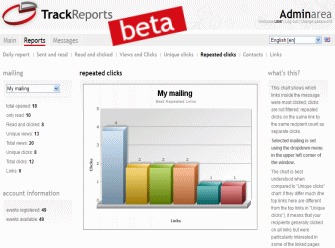
TrackReports is one of the most useful tools for analysis and monitoring of your email campaigns. It integrates seamlessly with SendBlaster, being able to provide very important data with extreme accuracy for proper management of your mailing.
Today it is even richer and more user-friendly features!

Here is the news:

1 -New graphics
A more original and professional design will make browsing more pleasant and intuitive.

2 – Improved performances and databases
The loading of pages, the calculation of statistics and links to databases have been optimized to make more fluid navigation through the system and reporting.

3 – Multilingual support
Soon, the assistance will be provided also in the main foreign languages ​​such as Spanish, Portuguese, German and French.

4 – More compact link format
The URL that will form the tracking link has been reduced and will be more readable, for example, for the recipient that can view text only emails.

Continue reading ‘The New TrackReports is Online!’

How to Solve Character Encoding Problems with SendBlaster

SendBlaster fully supports a wide variety of international character sets. Despite that, sometimes it happens that users with non-latin character sets contact us saying they get encoding issues. No panic!

SendBlaster simply relies on Windows codepage for displaying non-latin character sets (Cyrillic as well as Greek, Arabic, Hebrew, etc).
To solve this sort of encoding problems, simply make sure your language is used both for codepage and for number / dates format. Display language is not relevant.

In short, please follow these basic instructions:

Open Windows Control Panel, Regional and Language Options, and make sure that

1) in “Format” tab, the format for numbers and dates is set to your language (for example Russian) – not to English or any other language.

2) In “Advanced” (WinXP) or “Administrative” (Vista, Win7) tab, the “Language for non-Unicode programs” is set to your language (for example Russian). Changing this will require re-starting your PC.

Finally, when you compose your message, choose “windows-1257″ charset and make some tests composing a new message from scratch instead of editing an existing one.

You can also find a good tutorial on this site.

If this does not help, open a ticket and attach the needed files to your request.

Exclusive turboSMTP Promotional Codes

There is a good news for both our free users and paid customers.
As you might already know, we have recently partnered with turboSMTP, a fast-growing professional SMTP service provider, to allow all SendBlaster users a free, limited-use turboSMTP account, with no configuration or registration needed.
After the 100 messages limit has been reached, users can choose the plan that best suits their needs, between prepaid packaged and monthly/yearly convenient subscriptions.

And now the best part. We’ve just got some exclusive promo codes from the folks at turboSMTP!

SENDBLAST04111
This promo code works with the “20,000 emails/month Plan” and gives you a 20% discount on the first month.

SENDBLAST04222
This second promo code works with the “20,000 Prepaid Credits Plan” and gives you a 20% one time discount.

SENDBLAST04000
This third promo code gives you 10% off any turboSMTP plan (monthly plans and prepaid credits).

All these promo codes expire on April 30 May 31, 2011 and they are valid only for new sign-ups.

How to use these turboSMTP promo codes?
Visit turboSMTP site. During checkout, you will see the “Promotional Code” field. Enter the promo code you wish to use (remember they are case-sensitive); and then click “Validate Code.” Your Promotional Code will be automatically applied onto the balance. You can either continue shopping or proceed to checkout.

We highly recommend turboSMTP to anyone who wants to improve delivery rates and avoid annyoing downtime, queues, poor IP reputation issues.
And, indeed, we hope you enjoy saving money with these fantastic coupons!

8 FREE Easter Email Templates

We have just released a free template pack designed for Easter 2011 to use with SendBlaster.
The Easter package includes 8 original free HTML templates, fully customizable and compatible with all major email clients.
All these templates come with .eml format that you can download and send using SendBlaster!

How to import Easter HTML email templates into SendBlaster:

  • Download Easter email template pack (zip)
  • Extract .eml files and copy them in the SendBlaster’ Template folder (ex “C:/Documents/Sendblaster/Template”
  • Open SendBlaster (or download it HERE)
  • Select “Compose message”
  • Click on “Choose template”
  • Choose your favorite Easter email template
  • Fill your list (or import it from outlook express, .csv,…)
  • Compose your personalized message

..and finally send your custom ecard to your recipients!

We would like to thank you the folks at Neuron Web Agency for offering our users these brand new email templates!

Happy Easter everyone!

Email Marketing Software: How to Create a Newsletter in 3 Minutes

In this short video we show you how to create and send a newsletter with SendBlaster PRO 2 … in less than 3 minutes.  You will realize that there’s no programming required to create engaging professional-looking newsletters. Check it out!

IE 9 Compatibility Update for SendBlaster 2

We’ve just released an update which fixes a compatibility problem with Internet Explorer 9. If you run Windows Vista or Seven, and recently installed Internet Explorer 9, you may be experiencing issues with the HTML editing panel; after you load a template, or an external html / eml file, you are not able to edit it in preview mode – it looks like it’s locked, or write-protected.

The technical reason for this behaviour is a “change” (but we may well call it a bug…) in IE9 “designmode” implementation by Microsoft – which was not present in IE9 betas, only in RCs and the final release. Since an embedded instance of Internet Explorer, switched to “designmode”, is used by SendBlaster as the HTML editor, this is causing the problem.

As soon as we were reported of the issue, we released an update (2.0.127) which features a workaround, and works perfectly with IE9. If you installed Internet Explorer 9, please update to SendBlaster 2.0.127 (or later):

This IE9 “bug” is causing issues with lots of HTML editing softwares using the same component, including some popular e-mail clients (even from Microsoft, some users reported).

Therefore, it is very likely that Microsoft will correct it with some IE9 update. But our suggestion at present is not to install IE9, or revert back to IE8 if you are encountering similar issues with your HTML editors or e-mail clients (http://windows.microsoft.com/en-US/windows7/how-do-i-install-or-uninstall-internet-explorer-9)

SendBlaster 2.0.125: New Features, General Improvements, Bug Fixes

We are happy to inform you that we have just released a new version of SendBlaster 2 – which contains some new features, general enhancements and a couple of bug fixes.
This new version is actually the most substantial update for the SendBlaster 2.x series – originally published one year ago.

The main highlights of this latest SendBlaster 2 release (2.0.125) are:

  • SMTP and POP3 profiles can be saved to a file and loaded from a file
  • Snapshots can be saved to a file and loaded from a file
  • Pop-up notifications for relevant news
  • Tracking links can be masked using TinyUrl (experimental)
  • Tracking links can optionally update linked text too, in order to avoid false “phishing” alerts
  • New “Select all” button in “Manage Lists” panel

But there’s even more!  This new version of SendBlaster 2 comes bundled with turboSMTP – one of the most reliable SMTP professional providers on the Internet – in order to offer all SendBlaster users a free, limited account, which will allow them to send up to 100 messages, either with a single or multiple mailings, without having to manually configure it.

The test account does not even require a registration. This will let you fully evaluate the service’s performance and see for yourself why so many users chose turboSMTP services! After evaluating the service, if you are satisfied (we are sure you will be),  you can choose the plan which best suits your needs.

To download SendBlaster 2.0.125 visit this page.
Don’t forget to follow us on Twitter and Facebook for updates and info on new releases.


Load Times Plugin made by Cheap Web Hosting