website

Tag Archive for 'subject lines'

This post is part of a series of guest posts authored by popular bloggers and internet business consultants. Today's guest post is written by Nancy Parker.

10 Guidelines For Writing Effective Subject Lines

First impressions are the most important and that applies to emails as well. Whether you are trying to get a reader to join your organization or to shop at your store, you need a good subject line. It takes a reader less than one second to decide whether or not your email will be opened or deleted. Here are 10 subject line guide lines to grab your reader’s attention.

  1. Discount
    Everyone likes saving money. Offering them a good deal will have the reader intrigued. Be sure that the money saver is something worth opening. “50% off Next Purchase” or “Save Big”
  2. Deadline
    Giving your reader a deadline gives the reader a sense of urgency. Telling them that something won’t last long will have them acting fast. “Don’t wait until it’s too late!” or “Last chance to join”
  3. Humor
    This can be difficult but examine your email content and think of a pun or a statement that will have the reader smiling. Like a cooking email “Recipe for disaster” or an automotive business “Why did the chicken cross the road”.
  4. Personable
    Think about your audience and find a common denominator and then personalize. If they are single young adults, mothers or seniors, address them personally. “Ladies choice” or “Every golferswish list”.
  5. Benefits
    Whether it’s a discount on an item, or news about some new product, we want to know why and how it will benefit us. We are naturally selfish humans. “Clear skin is near” or “You have money saving options”. Continue reading ’10 Guidelines For Writing Effective Subject Lines’
This post is part of a series of guest posts authored by popular bloggers and internet business consultants. Today's guest post is written by Glen B, who helps individuals and businesses at NetIdnow on how create websites using using WebStudio Website Builder.

Guest Post – How Not To Throw Your Email in the Spam Bin

Email Marketing is one of the most cost-effective ways in pulling off your eCommerce website’s success. But while you are doing an email marketing campaign, you will always be worried if your emails get through the spam filters of your recipient’s inboxes and not to the spam folder.

Here are some tips that you should consider to not end up as Spam.

  • Use the right words
    Email subjects and content containing “FREE”, “SALE”, and other promotional lingo can tip off spam filters to not place your email at the inbox. Use the right words in the subject line and as well as in your email content when sending an email. The best thing to do is to use your company name, label, and brand as your subject as well as the intent of the email. For example, other than using “FREE Ebook to Online Marketing”, you can modify it and use “SEoptimizemenow: Your Guide to Online Marketing Success”. In that way, you can be sure that it gets to your recipient’s inbox and is interesting enough to be read by them.
  • Be more personal
    Every recipient’s got a name and it is so much better if you mention their names in greeting them. This makes your email look more personal but also professional, making your recipients feel that the email is really drafted for them.
  • Provide a clear Unsubscribe Link
    Honor those recipients who click the unsubscribe link. While it is sad to let them go, you have to give them the freedom to continually receive your emails or not. This should also be done quickly as you do not want to be labeled as spam by these recipients.
  • Do not use Large Images to Contain your Email
    Large images can also tip off spam filters to filter your email as spam. Should you really need to use an image, keep it to a maximum of 600px.
    Continue reading ‘Guest Post – How Not To Throw Your Email in the Spam Bin’

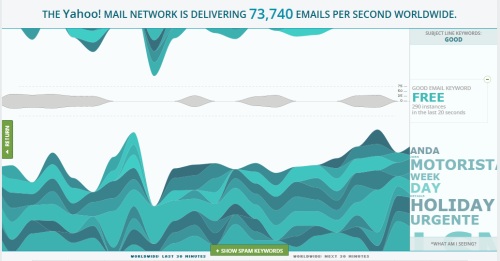
Monitor Spam And Good Subject Lines With Yahoo! Mail Visualization

Yahoo is making life a little easier for email marketers. They recently released a visualization tool that makes the flow of email through Yahoo’s servers more transparent, something that should be of interest to anyone who markets through email. With this tool, you can see the volume of email flowing through any area of the world with a few clicks of a mouse – and it’s free.

How Does the Yahoo Visualization Tool Work?

Upon accessing the tool, you’ll see a world map. Click on any spot on the map, and you’ll see how many emails are being delivered per second to that area as well as how many have been targeted as spam. By playing around with the tool, you’ll see that Yahoo labels lots of email as spam. In fact, they block more than 300,000 emails per second worldwide.

Here’s what makes this tool useful for email marketers. If you look on the left-hand side of the map, you’ll see a green bar labeled “trending keyword tools.” This lets you get a sneak peak at the top keywords currently being used in email subject lines and how often they appear in emails from a certain area of the world. Although it appears the information is in real time, it’s actually delayed by about an hour.

Continue reading ‘Monitor Spam And Good Subject Lines With Yahoo! Mail Visualization’

Email Marketing: Four Email Errors That Can Cost You Subscribers

We all know that email marketing is one of the most effective ways to reach new customers. If you’re not capturing customers’ email addresses and sending them useful information, you’re missing out on sales. But there’s a right way and a wrong way to do email marketing – and many companies do it the wrong way. Here are four of the worst email marketing mistakes companies make – and how to avoid them.

1 – Contacting the Customer Too Frequently or Not Frequently Enough
Some companies make the mistake of sending emails to customers every day, sometimes more than once That’s one of the quickest ways to get a customer to unsubscribe. Most people are flooded with emails and offers, and they’re ready to hit the delete button when your email arrives too often. At the other extreme, some companies capture customers’ email addresses and rarely follow up. Contact the customer too frequently, and you’ll be labeled a pest. But if you rarely send them anything, they may forget they signed-up and think you’re a spammer. For most customers, emailing once or twice a month is reasonable.

2- Trying Too Hard to Sell
Customers hate being sold to. Don’t turn your email into a sales pitch. Provide your customers with useful information and a link to your site. Give them something of value, and they’ll look forward to your emails – and you’ll be rewarded with repeat business. Ask yourself what of value you can offer your customers instead of thinking in terms of what you can sell them. They’ll love you for it – and it’ll show in your bottom line.

Continue reading ‘Email Marketing: Four Email Errors That Can Cost You Subscribers’

Anatomy of an Email

According to BNJ.com there’s a simple structure that emerges across the successful emails, and ”just like most movies have three acts”.

Here below you can find the Anatomy of an email. The first element considered is the Subject line (Engage) followed by the Headline (Context), Act 1 (Evidence), Act 2 (Proposition),  Act 3 (Support), and The Ask.

What do you think about this scheme?

What Are You Putting Before The Subject Line?

Copywriters know that the most important part of any piece of marketing is the headline. If they can’t work a good hook into the first line of the brochure, the sales letter or the flyer, it doesn’t matter what they write in the body of the material. It won’t be read.

For email marketers, the equivalent to the headline is the subject line… and it looks so much harder to get right.

Readers are so used to seeing email subject lines that promise them “cheap pharma,” “repl1ca watches” and worse that they glance at the subject lines and delete anything that looks like it’s selling them something. Email marketers then have to beat their heads against the wall to come up with a subject line that reflects the content but doesn’t sell, that’s personal but can still go out to thousands of recipients.

Continue reading ‘What Are You Putting Before The Subject Line?’

Increase Opens with Killer Subject Lines

j0435880One of the most important elements of a successful newsletter is the subject. 1 out 3 Americans open emails solely based on the subject line (Jupiter Research, 2007) and nearly 70% of Americans choose to click the “This is Spam” button based on what they see in the subject line. The challenge is then to grab the attention of your subscribers: a compelling subject line can improve dramatically your emails’ open ratios. Below are some tips:
- Short is better. Keep subject lines between 20 and 50 characters.
- Avoid spam keywords. Words such as free, stock, money, password etc may trigger spam detection software. Even misspelled words, symbols and punctuation such as ! , € and $ can play a role in your email being filtered. So it not necessary, keep them out of your subject lines.
- Forget all CAPITAL LETTERS. It increases the chances of getting blocked as spam by the filters.
- Write different subject lines. If you have a list of 100.000 addresses. take out three groups of 1.000 emails and send each a separate test subject line. 24/48 hours later look at your reports and choose the winning subject lines according to open and conversion rates.
- Brand your email. Include the name of your site or your newsletter. It will create a stronger name recognition. It’s a good habit to set the “From” attribute of your email to include your name and your companies name.

Continue reading ‘Increase Opens with Killer Subject Lines’


Load Times Plugin made by Cheap Web Hosting