website

Archive for the 'Tools' Category

Page 2 of 2

FREE Halloween HTML Email Templates

Pumpkins, ghosts, zombies, skulls…yep, it’s Halloween again! And this year we want to celebrate it with you.
Our designers have just created some great looking FREE templates to celebrate the scariest and funniest holiday of the year. You can grab our Halloween HTML Email Templates  and use them for your Halloween emails. Feel free to modify them, add pictures, icons, change fonts, etc.

Halloween Email TemplatesA BIG thanks to: CrucialdGarnettrulesLethorgius

How to use Halloween HTML email templates:
Download Halloween email template pack (zip)
Extract .eml files and copy them in C:/Programs/Sendblaster/Template
Open SendBlaster (or download it HERE)
Select “Compose message”
Click on “Choose template”
Choose your favorite Halloween template

..and finally enjoy your Halloween email (BOO!)

How to Use the Blacklist Feature

When a recipient requests to be unsubscribed, you should change his/her subscription state.  SendbBlaster gives you a second chance: the “blacklist” feature.
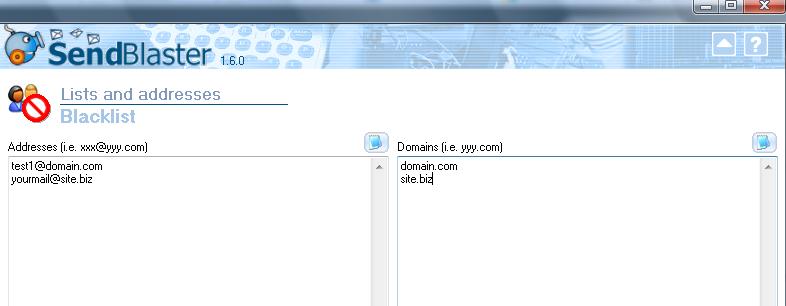
Blacklist is a filter that prevents certain e-mail addresses or domains from receiving mails, independently from their subscription/activation state.

How does it work?
When you send a message to a given list, before each mail is actually sent, Sendblaster checks whether the recipient’s address or domain is included in the blacklist: if it is, that mail is skipped and a “blacklisted” message will be shown in the log panel.

You can setup two different blacklists:

  • Addresses blacklist: all these e-mail addresses will never receive a mass emailing
  • Domains blacklist: no address belonging to that domain will ever be sent a message.

Continue reading ‘How to Use the Blacklist Feature’

Duplicate Emails? No, thanks!

It may happen to deal with big mailing lists that contain duplicate addresses.
Don’t worry! SendBlaster automatically searches for duplicates and fixes them.
And no action is required! Duplicates in the same mailing list are automatically filtered out when sending, even if you have disabled the Don’t add addresses when duplicated or already present in the list option during your import operations.
We consider it an extremely effective and hassle-free tool. You’ll never annoy your recipients with doubles and, of course, you may improve the performance of your campaigns…instantly!

7 Free Easy-to-use Scripts for Efficient Web Sites

Today we’d like to share with you some free scripts that can turn out to be useful for your website/blog.

Let’s take a closer look at these scripts (created by our development team).

1. WordPress double optin widget bulk email plugin for newsletter subscription

This simple WordPress mailing list management widget (plugin) sends emails with “Subscribe” and “Unsubscribe” subject for newsletter opt-in and double opt-in email list management.
The email list widget works with common bulk emailers and with SendBlaster’s newsletter software subscription management with custom field integration, for email merge purposes.

2. Mailing Spam Check


The Mailing Spam Check software rates your emails and analyzes the email content spam score: in other words you know in few seconds what is wrong in your email!  MailingCheck program executable incorporates all the common server side SpamAssassin anti spam test rules that you need to respect in order to go straight to your customer’s inbox.

Continue reading ’7 Free Easy-to-use Scripts for Efficient Web Sites’


Load Times Plugin made by Cheap Web Hosting