website

Tag Archive for 'spam'

What Annoys People About Emails [Infographic]

Here is an awesome infographic by ccLoop, the winner of the 2011 AlwaysOn Global 250, focused on the growth of Email, volume of Email in numbers, Top 4 Annoyances and benefits of Email.

Click the image for a full-sized version

This post is part of a series of guest posts authored by popular bloggers and internet business consultants. Today's guest post is written by Glen B, who helps individuals and businesses at NetIdnow on how create websites using using WebStudio Website Builder.

Guest Post – How Not To Throw Your Email in the Spam Bin

Email Marketing is one of the most cost-effective ways in pulling off your eCommerce website’s success. But while you are doing an email marketing campaign, you will always be worried if your emails get through the spam filters of your recipient’s inboxes and not to the spam folder.

Here are some tips that you should consider to not end up as Spam.

  • Use the right words
    Email subjects and content containing “FREE”, “SALE”, and other promotional lingo can tip off spam filters to not place your email at the inbox. Use the right words in the subject line and as well as in your email content when sending an email. The best thing to do is to use your company name, label, and brand as your subject as well as the intent of the email. For example, other than using “FREE Ebook to Online Marketing”, you can modify it and use “SEoptimizemenow: Your Guide to Online Marketing Success”. In that way, you can be sure that it gets to your recipient’s inbox and is interesting enough to be read by them.
  • Be more personal
    Every recipient’s got a name and it is so much better if you mention their names in greeting them. This makes your email look more personal but also professional, making your recipients feel that the email is really drafted for them.
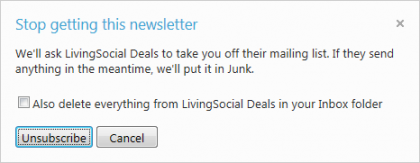
  • Provide a clear Unsubscribe Link
    Honor those recipients who click the unsubscribe link. While it is sad to let them go, you have to give them the freedom to continually receive your emails or not. This should also be done quickly as you do not want to be labeled as spam by these recipients.
  • Do not use Large Images to Contain your Email
    Large images can also tip off spam filters to filter your email as spam. Should you really need to use an image, keep it to a maximum of 600px.
    Continue reading ‘Guest Post – How Not To Throw Your Email in the Spam Bin’

Monitor Spam And Good Subject Lines With Yahoo! Mail Visualization

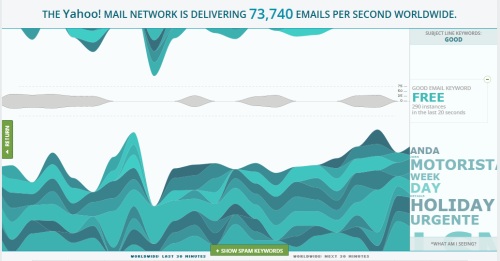
Yahoo is making life a little easier for email marketers. They recently released a visualization tool that makes the flow of email through Yahoo’s servers more transparent, something that should be of interest to anyone who markets through email. With this tool, you can see the volume of email flowing through any area of the world with a few clicks of a mouse – and it’s free.

How Does the Yahoo Visualization Tool Work?

Upon accessing the tool, you’ll see a world map. Click on any spot on the map, and you’ll see how many emails are being delivered per second to that area as well as how many have been targeted as spam. By playing around with the tool, you’ll see that Yahoo labels lots of email as spam. In fact, they block more than 300,000 emails per second worldwide.

Here’s what makes this tool useful for email marketers. If you look on the left-hand side of the map, you’ll see a green bar labeled “trending keyword tools.” This lets you get a sneak peak at the top keywords currently being used in email subject lines and how often they appear in emails from a certain area of the world. Although it appears the information is in real time, it’s actually delayed by about an hour.

Continue reading ‘Monitor Spam And Good Subject Lines With Yahoo! Mail Visualization’

New Hotmail Features: Email Marketing Friend or Foe?

Hotmail feels that it has won the war against spam, having announced that true spam in users’ inboxes has reduced to under 3% using SmartScreen™ filtering. Now they have turned their attention to graymail, the emails that users may or may not be happy to receive. Graymail includes newsletters that subscribers may have forgotten signing up for or time-limited offers that clog up users’ inboxes long after the deal has expired.  They found out that “more than half of the mail in a typical inbox is newsletters or deals, 17% is social updates, and about 14% is person to person email”.
For this reason, Hotmail announced on their blog that they will release soon some new features  to help users filter out unwanted emails and clean up their inboxes.

Let’s see the most relevant ones.

Newsletter Category
Using SmartscreenTM technology, Hotmail  automatically categorize newsletters, removing them from the general inbox. Boasting an initial accuracy rating of 95 percent, Hotmail’s technology will improve as users tailor their preferences. This feature will make it easy for users to ignore unwanted email newsletters. However, it will also allow them to quickly locate relevant information. Provided your emails contain valuable content of interest to your subscribers, Hotmail’s new newsletter category could work to your advantage.

Continue reading ‘New Hotmail Features: Email Marketing Friend or Foe?’

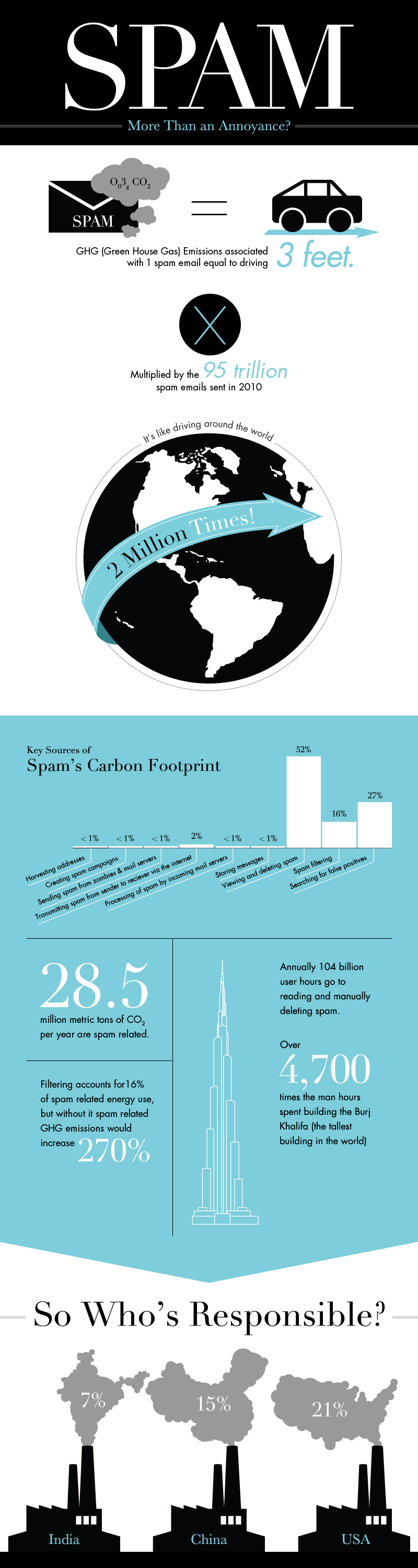
The Environmental Cost of SPAM [Infographic]

Did you know that SPAM has also a considerable environmental cost?
The folks at WebpageFX have calculated the carbon footprint of the world’s spamming activities and they discovered that “a certain amount of Spam emails is actually the equivalent to the level of Green House Gas (GHG) emissions released from driving 3 feet.”
In particular 28.5 million metric tons of CO2 per year are spam related. Pretty impressive.

Check out the infographic below and you will find out why spam is more than just an annoyance.

This post is part of a series of guest posts authored by popular bloggers and internet business consultants. Today's guest post is written by Daniela Baker, who helps entrepreneurs at CreditDonkey with evaluating the best credit card for small business.

How to Keep Your Email Campaign Out of the Spam Folder

The spam folder—every email marketer’s worst nightmare. Once your emails are flagged as spam, your campaign metrics plummet, going from a potential success to an email flop. Thankfully, there are some tactics you can employ to help ensure your emails stay in your recipients’ inbox instead of their spam folder.

Here are the tips you can follow to keep your email campaign out of the spam folder.

Follow the CAN-SPAM Act

Whether or not your emails are getting sent to the spam folder, it’s important that you follow the CAN-SPAM Act. It’s a federal mandate that email marketers must follow. Included in the act are the following points, as outlined by the Federal Trade Commission:

  • Don’t be misleading or use false information in the header (“To” and “From” fields)
  • Skip the deceptive subject lines
  • Clearly identify the email as an advertisement
  • Include your business mailing address (this can include a P.O. Box)
  • Include opt-out instructions for future e-mails
  • Follow-up on opt-out requests in a timely manner; opt-outs must be processed within 10 business days

Also, it is important to note that you’re responsible for all email marketing efforts completed for your business. This includes email marketing that you pay another firm to complete for your company. This makes it important for you to do your due diligence and monitor any efforts that are being completed on your behalf.

Continue reading ‘How to Keep Your Email Campaign Out of the Spam Folder’

The Evolution of Spam [Infographic]

Enjoy this cool infographic displaying the evolution of spam. Be sure to scroll down to the bottom …you’ll find 5 useful tips on how to not look like a spammer.

The Evolution of Spam

Via | Marketo


Load Times Plugin made by Cheap Web Hosting